

IP Locking for Enterprises: Best Practices
IP locking helps limit who can reach a PHP script, but it should never stand alone. If I had to boil this article down to a short checklist, it would be this: map every trusted IP path, verify proxy behavior, keep allowlists small, enforce rules at more than one layer, and plan for IP changes before they hit production.
Here’s the plain-English version:
- IP locking controls source access by allowing only approved IP addresses or CIDR ranges.
- It works best for admin tools, internal apps, and licensed customer-hosted scripts.
- It can fail fast if I miss a VPN exit, NAT path, proxy, or cloud egress IP.
- Headers like
X-Forwarded-Forare risky unless they come from a proxy I control. - SourceGuardian can bind execution to an IP so the script won’t decrypt or run from a different address.
- Break-glass access matters because IP changes, office moves, and routing updates happen.
- Reviews should happen at least quarterly and after any network or cloud change.
A few points matter most:
- I should log what PHP actually sees, such as
REMOTE_ADDR, before turning rules on. - I should assign one owner for allowlist changes, approvals, and emergency updates.
- I should apply checks at the firewall, web server, and PHP level so one missed layer does not leave the app open.
- I should keep licensing, infrastructure, and allowlists in sync to avoid lockouts.
If you want the shortest answer: use IP locking as a narrow access filter, not as your only security control. Pair it with MFA, role-based access, TLS, logging, and change control, then test from every network path your users and systems rely on.
| Area | What I should do |
|---|---|
| Network paths | Verify VPNs, proxies, NAT, load balancers, and static IPs |
| Rule ownership | Set one owner, approval flow, and emergency process |
| Enforcement | Block at firewall, web server, and PHP/script layer |
| Header trust | Accept forwarded IP headers only from managed proxies |
| SourceGuardian use | Match IP, domain, or hardware locking to the deployment model |
| Change handling | Update licenses before deployment when IPs change |
| Review cycle | Audit denied requests and allowlist changes every quarter |
Below, the article expands that checklist into rollout and maintenance steps for enterprise PHP environments.
SourceGuardian IP Locking Methods: Enterprise Comparison Guide
2. Pre-Deployment Checklist: Network and Governance Basics to Confirm First
Before you turn on IP locking, make sure your network paths and approval flow are nailed down. Miss one proxy, VPN exit, or NAT route, and you can lock out the right people or let the wrong traffic through.
2.1 Verify Trusted IP Ranges, Proxies, VPNs, and NAT Behavior
Start by documenting every path the app might see. That includes public IP ranges, proxies, VPN exits, load balancers, and NAT routes. In staging, log $_SERVER['REMOTE_ADDR'] and $_SERVER['HTTP_X_FORWARDED_FOR'] together so you can see which hop PHP is actually reading
When you parse X-Forwarded-For, scan from right to left and stop at the first untrusted hop. Then validate each possible IP with FILTER_VALIDATE_IP before you use it
If you're using SourceGuardian's encode-to-IP feature, double-check that the target server or client uses a static IP. The reason is simple: the IP becomes part of the encryption key. If that address changes, the script won't decrypt or run
2.2 Assign Ownership for Allowlists, Approvals, and Emergency Changes
An allowlist needs one clear owner and a clean approval path. Decide who can ask for IP additions, who signs off on them, and how emergency changes work. Otherwise, a short-term exception can quietly stick around far longer than it should.
For break-glass access, use an external license file so IP changes don't force you to re-encode the app. SourceGuardian supports this setup:
"Locking to an external license file... is ideal for creating protected scripts to be deployed to different users and it even allows you to assign different locking options to different users."
You can also run the license generator from the command line, which helps with CI/CD-driven updates
2.3 Confirm Enforcement Points Across Firewall, Web Server, and PHP
Apply IP checks at the network layer, the web server layer, and the PHP layer
Before rollout, test each layer in staging using the same network layout you expect in production. Check that out-of-range traffic gets blocked before it reaches the app. Check that web server rules deny access the way you expect. Then confirm that PHP-level checks, or SourceGuardian's bytecode-level IP locking, catch anything that gets past the earlier layers
Also account for CLI and cron jobs, where $_SERVER data may be missing
With paths, ownership, and enforcement mapped, the next checklist narrows rule scope and tightens day-to-day controls.
sbb-itb-f54f501
3. Core IP Locking Best Practices Checklist
3.1 Use Allowlists, Scope Rules Tightly, and Store Them Centrally
Once you've mapped your trusted paths, tighten the allowlist. Give each script or endpoint access to the smallest IP set possible. And only lock down the scripts and endpoints that actually need it. If you make an exception, write it down and set a fixed expiration date. That way, temporary access doesn't quietly turn into permanent access.
Keep allowlists in one governed source of truth. If changes live in different places, things drift fast. One central record helps keep deployments aligned and access rules up to date.
3.2 Enforce IP Checks at Multiple Layers and Distrust Unverified Headers
Apply the same allowlist at every layer that matters: firewalls, load balancers, web servers, and PHP. If one layer is left open, the script is still exposed. That's the weak link problem in plain English.
Once enforcement is live, put your attention on testing and response. Treat forwarded IP headers as untrusted unless they come from a managed proxy. In short, trust those headers only when your managed proxy sets them.
3.3 Reduce Lockouts With Staging Tests, Monitoring, and Break-Glass Access
Test allowlist changes in staging before they hit production. Then watch blocked requests, support tickets, and access failures so you can catch rules that are too narrow or causing extra friction. Small mistakes here can lock out the wrong people fast.
If access breaks, keep a break-glass path for emergency approval without turning off the allowlist. Also review approved IP data on a regular basis and update it as access patterns shift.
For encrypted scripts, map these rules to the product's locking and licensing model.
4. Using SourceGuardian for Enterprise IP-Based Script Locking
Once your trusted IP ranges and approval owners are set, the next step is simple: turn those rules into SourceGuardian locking settings. This is where policy becomes enforcement.
SourceGuardian lets you restrict where PHP code can run. So if your security, legal, and operations teams have already agreed on approved run locations, SourceGuardian can enforce that through IP, domain, and hardware locking. Encoded scripts won’t run outside the approved setup. And with IP-based encoding, the script can’t be decrypted from the wrong address.
4.1 Match SourceGuardian Locking Options to Enterprise Deployment Models
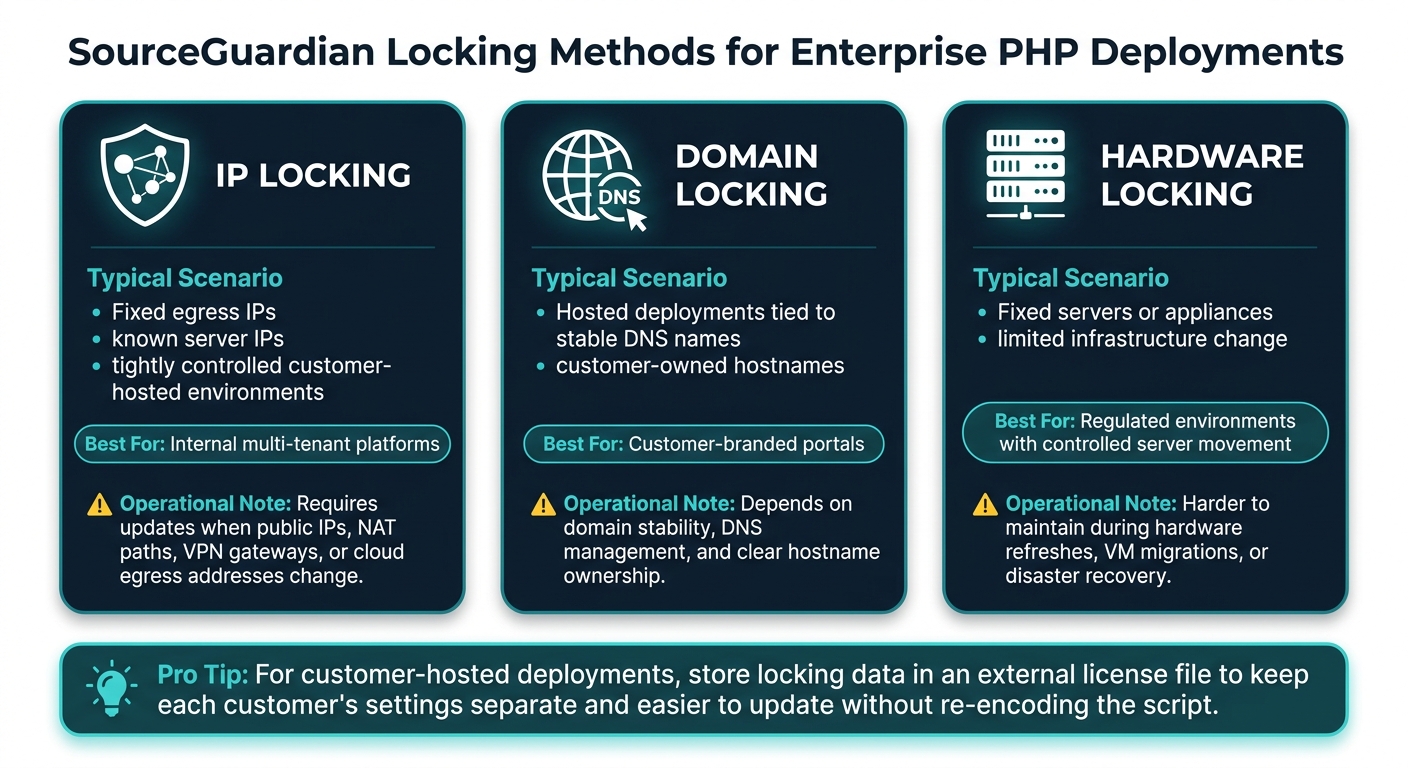
The best locking method depends on the deployment model you’ve already approved. Here’s how the main options line up with common enterprise setups and what each one means for day-to-day upkeep.
| Locking method | Typical enterprise scenario | Operational considerations |
|---|---|---|
| IP locking | Fixed egress IPs, known server IPs, tightly controlled customer-hosted environments | Requires updates when public IPs, NAT paths, VPN gateways, or cloud egress addresses change |
| Domain locking | Hosted deployments tied to stable DNS names or customer-owned hostnames | Depends on domain stability, DNS management, and clear ownership of hostnames |
| Hardware locking | Fixed servers or appliances with limited infrastructure change | Can be harder to maintain during hardware refreshes, VM migrations, or disaster recovery events |
A pattern you’ll see often is this:
- IP locking for internal multi-tenant platforms
- Domain locking for customer-branded portals
- Hardware locking for regulated environments where server movement is tightly controlled
For customer-hosted deployments, it’s smart to keep locking data in an external license file. That means IP or domain limits don’t have to be baked directly into the encoded script. Instead, the license file stores those settings on its own. This keeps each customer’s license data separate and easier to track.
4.2 Plan Licensing Operations Around IP Changes and CI/CD Workflows
When infrastructure changes, update the license before deployment. Treat IP changes like any other infrastructure change: request it, approve it, validate it, then deploy it. If that process isn’t written down and followed, production lockouts can happen fast.
For teams that deploy often, SourceGuardian PRO includes dynamic licensing and CI/CD support. You can place the license generator inside your CI/CD pipeline so approved IP and domain updates move through the build process in step with the rest of the change. In practice, that means licensing stays aligned with infrastructure instead of lagging behind it.
Any change to those license-related files should go through a pull request with security and network approval. That gives you a clean review path and helps avoid last-minute breakage.
You can also use the custom text field to store ticket IDs or approval timestamps for an audit trail.
5. Conclusion: A Practical Enterprise Checklist for Safer PHP Script Access
IP locking is one part of a defense-in-depth setup. On its own, it’s not enough. Pair it with authentication, segmentation, logging, and change control. From there, the next step is rollout validation.
Before rollout, trace actual request paths through NAT, VPN, and proxies. Then test from office, remote, and build-agent networks. This is where teams often spot missed proxies, stale rules, or bad routing. Finding those issues in staging helps stop bad enforcement and avoidable lockouts in production.
After rollout, shift into maintenance mode. Keep allowlists tight, centralized, and default-deny. Review high-risk lists every quarter and after any network, cloud, or office change. Log denied requests and every allowlist change so you can see who changed it, when, and why.
For encoded deployments, use that same discipline at the script layer. SourceGuardian can enforce IP restrictions at the script layer. With encode-to-IP, the approved IP becomes part of the decryption key. Use it as a script-layer control, not a network replacement.
Keep licensing, allowlists, and infrastructure changes in sync. Document exceptions, maintain break-glass access, and keep rollback tested.
FAQs
What can break IP locking?
IP locking sounds simple, but it can fall apart when something masks or shifts where a request comes from. That includes IP spoofing, proxy servers, NAT, and dynamic IP addresses used by mobile networks or VPNs.
That’s why static IP locking alone can be shaky. It tends to work better when you pair it with user authentication, session management, and rate limiting.
How do I avoid IP lockouts?
Don’t rely on IP locking by itself. It works best as one layer in a broader setup that also includes token-based authentication and strong session management. That matters because mobile networks, VPNs, and dynamic IP addresses can change often, which can trigger false positives and block legitimate users.
If you run a more complex hosting setup with proxies or load balancers, make sure your application reads the right server headers so it can identify the client IP correctly. It’s also smart to review and maintain your IP whitelist on a regular basis.
When should I use SourceGuardian IP locking?
Use SourceGuardian IP locking when you need to limit your PHP scripts to approved servers, such as specific internal machines or client-dedicated hardware.
It works well for distributed teams, multi-server setups, and commercial deployments where you need tight control over where your application can run. For stronger protection, add IP restrictions to the encryption key or manage them through license files.