

How Automated Scanning Secures PHP Apps
If you only do three things, do these: run composer audit on every build, run static analysis before merge, and scan staging before release.
I see the point of this workflow in one stat: Verizon found that 99.9% of exploited flaws were attacked more than a year after the CVE was published. That means many teams are not losing because bugs are unknown. They are losing because known issues stay in code for too long.
Here’s the short version:
- Dependency scanning checks Composer packages for known CVEs
- Static analysis checks PHP code for risky patterns before it runs
- Dynamic testing checks a live staging app for runtime and config issues
- Release protection like SourceGuardian comes after scans, not before
What matters most is where each check runs:
- Build stage: SCA and SAST
- Pre-deploy stage: DAST on staging
- Packaging stage: encode distributed PHP only after scans pass
If I were setting a minimum PHP security flow today, I’d use this:
- Run
composer installandcomposer audit - Run PHPStan and Psalm taint analysis
- Deploy to a staging environment with side effects turned off
- Run DAST and block release on high-severity findings
- Encode the release build last, only if I ship PHP code to customers
Setting Up A Security Scanning Pipeline From Start To Finish DevSecOps
sbb-itb-f54f501
Quick comparison
| Check | What it looks at | Best place in CI/CD | Main job |
|---|---|---|---|
| SCA | composer.lock packages |
Build | Catch known vulnerable dependencies |
| SAST | PHP source code | Build/test | Catch risky code paths |
| DAST | Live staging app | Pre-deploy | Catch runtime and config flaws |
| Code protection | Release artifact | Packaging | Limit source exposure in distributed builds using PHP encoding |
This article explains how these checks fit together so you can stop bad packages, risky code, and staging issues before they ship.
Map security scans to each stage of a PHP pipeline
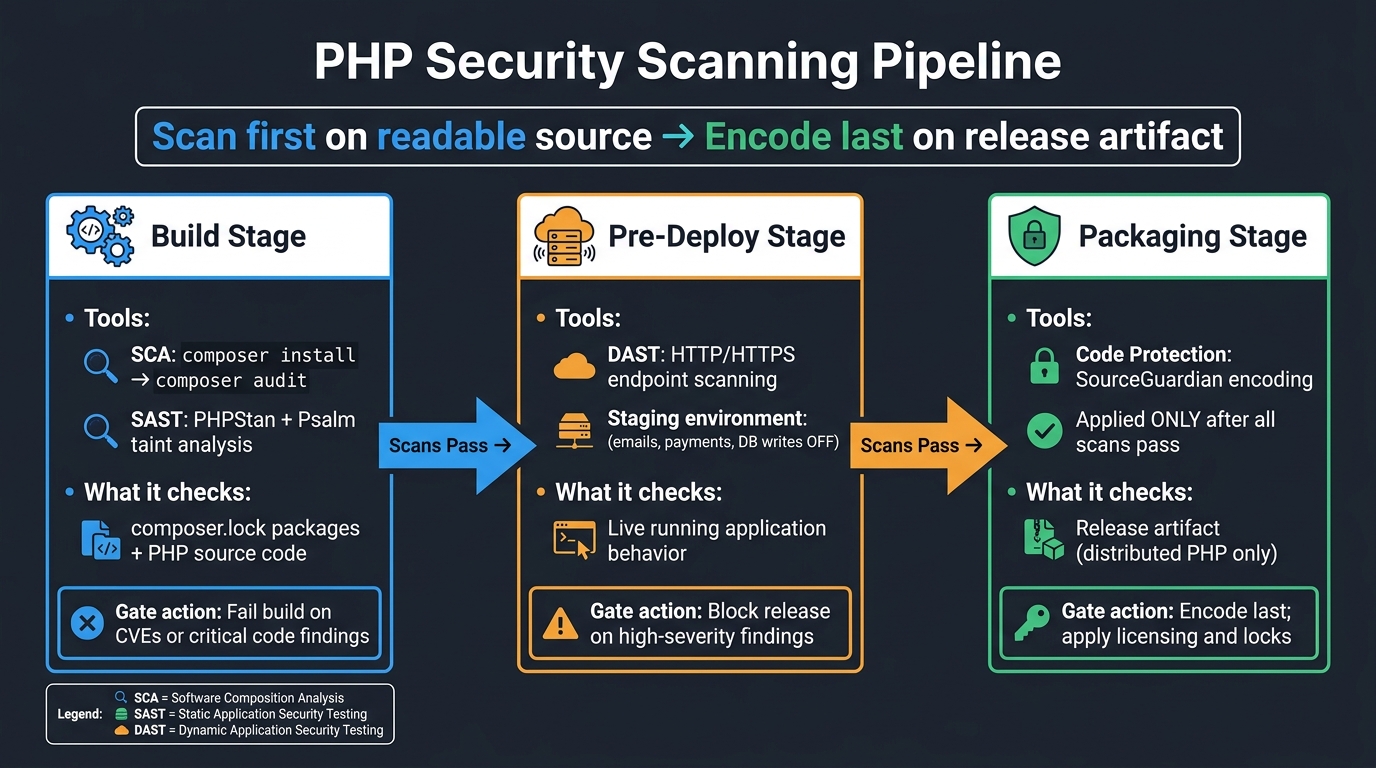
PHP Security Scanning Pipeline: Build, Stage, Deploy
Put each scan where it can stop the right artifact at the right time: build, staging, or deploy. The flow is simple. Start with build-time checks, then run live testing after the app is up in staging.
Build stage: run SCA and SAST before packaging
Software Composition Analysis (SCA) and Static Application Security Testing (SAST) both fit in the build stage, before packaging or deployment.
SCA flags risky packages early, when fixing them costs less and takes less effort. It checks your composer.json and composer.lock files against known vulnerability advisories.
Static analysis tools such as PHPStan inspect source code without running it. They can spot insecure coding patterns like SQL injection and unsafe deserialization before the app is packaged.
Pre-deploy stage: run DAST against a staging environment
Dynamic Application Security Testing (DAST) needs a live application, so it belongs in the pre-deploy stage against a staging environment. It sends real HTTP and HTTPS requests to your staging endpoints and looks for problems like weak security headers and auth flaws that static analysis won’t catch. Because staging is close to production, DAST can find runtime issues before release.
Comparison table: SCA vs. SAST vs. DAST for PHP
Think in three targets: dependencies, source code, and running endpoints.
| Scan Type | What It Analyzes | Typical PHP Use | Best Pipeline Stage | Strengths | Limitations |
|---|---|---|---|---|---|
| SCA | Third-party libraries | Composer packages & CVEs | Build | Fast; identifies known vulnerable components | Does not analyze custom code |
| SAST | Source code | PHPStan / static analysis | Build | Finds flaws without running the app; deep code coverage | Can produce false positives; misses config issues |
| DAST | Running application | HTTP/HTTPS endpoints | Pre-deploy (Staging) | Finds runtime and logic flaws, server misconfigurations | Slower; requires a fully deployed environment |
Each scan covers a different gap: packages, code, or runtime behavior. Next, turn these scan points into concrete Composer and analysis gates.
Add dependency and code scanning to your PHP workflow
Use Composer audit to catch vulnerable packages
After you map scan types to each pipeline stage, start with dependency checks.
composer audit checks the locked versions in composer.lock, which makes it a solid CI gate.
In practice, run composer install --no-interaction --no-progress and then composer audit. If the command returns a non-zero exit code, fail the job. For release gates, use --no-dev so you only check production packages.
It also helps to run a nightly or weekly audit on the default branch. That way, you can catch new advisories even when the code hasn’t changed. If that scan fails, send the result to an alert or open a ticket.
Post-install audits in CI still matter. Scheduled checks cover the cases where an advisory shows up days or weeks later.
Run PHP static analysis as a security gate
Once dependencies are gated, scan the code that calls them.
Use static analysis in the test stage to stop risky code before deployment.
Psalm taint analysis follows untrusted input as it moves to risky sinks, which makes it a good fit for SQL injection and XSS checks. Use PHPStan for correctness, then add security-focused rules where needed.
Focus on issues like:
- Unsanitized input in queries or output
- Unsafe process calls
- Missing
session_regenerate_id()after privilege changes - Hardcoded secrets
Fail the pipeline on error-level findings. Send warnings to alerts or tickets instead. Both Psalm and PHPStan can output JSON or SARIF for pull request annotations, dashboards, or issue tracking.
Table: Composer audit commands and CI behavior
Use the commands below as CI gates, not just manual checks.
| Command | Scope | Output | Best Use Case | Typical CI Response |
|---|---|---|---|---|
composer audit |
Locked dependencies in composer.lock |
Table by default | Baseline dependency check on every push | Fail on vulnerabilities |
composer audit --format=json |
Locked dependencies | JSON | Automated parsing, alerting, and ticket creation | Parse results and enforce policy |
composer audit --no-dev |
Production dependencies only | Table or JSON | Release gating for deployable code | Fail on vulnerabilities |
Scheduled composer audit on the default branch |
Current composer.lock |
Repeatable report over time | Catch new advisories in unchanged code | Alert or ticket |
psalm --taint-analysis |
Source code data flows | Security findings on tainted paths | Detect SQL injection, XSS, and command execution patterns | Fail on findings |
| PHPStan with security-focused rules/extensions | Source code correctness plus custom checks | Type and rule violations | Security gate for unsafe coding patterns | Fail on violations |
Run dynamic scans safely and act on findings
Configure DAST for realistic PHP application coverage
Once your build-time gates pass, DAST checks what your staged PHP app actually exposes.
Point your DAST scanner to a dedicated staging environment. Scan staging only. Turn off emails, payments, database writes, and background jobs so the scan reflects the app without causing side effects.
Prioritize results by severity, exploitability, and internet exposure
Triage findings based on severity, exploitability, and internet exposure. That helps you separate the stuff that can wait from the issues that should stop a release cold.
After you fix an issue, rescan staging to confirm the finding is closed.
Table: finding types and recommended pipeline response
Use each finding to decide whether to fail the release, require review, or queue a fix.
| Finding Type | Detected By | Typical Fix | Recommended Pipeline Action |
|---|---|---|---|
| SQL Injection | DAST | Separate user data from SQL query | Fail build; require manual code review |
| Weak Security Headers | DAST | Add or correct HTTP security headers | Warn and queue fix; block if critical headers are missing |
| Authentication Flaws | DAST | Enforce session controls and access checks | Fail build; require manual review |
| Server Misconfiguration | DAST | Harden server and application config | Fail build if high severity; queue fix otherwise |
Combine scanning with PHP code protection
Where SourceGuardian fits after scans pass
Once staging scans come back clean, move to release protection only if you distribute PHP code.
After SCA, SAST, and DAST pass, add SourceGuardian as the last packaging step for distributed PHP code. It encodes PHP source, applies encryption and obfuscation, enforces licensing controls, and its CLI works well in CI/CD automation. That makes it a simple fit for an automated release pipeline.
Run scans on readable source only. Encoding comes after static analysis and DAST.
Scanning vs. script protection in the release pipeline
Use this split so scanning happens first and code protection comes later.
| Technique | Primary Goal | Pipeline Stage | What It Protects | Typical Action |
|---|---|---|---|---|
| SCA | Find vulnerable libraries | Early build/test on source | Composer packages and third-party dependencies | Run composer audit; fail build on severe CVEs |
| SAST | Detect insecure code patterns | Early/mid CI on readable PHP | Custom application logic | Run static analyzer; block merge on critical findings |
| DAST | Catch runtime flaws | Pre-deploy on staging | Live HTTP behavior, auth flows, inputs | Scan staging; block release on high-risk findings |
| Script protection | Prevent reverse engineering and misuse | Late build or packaging | Distributed PHP code and encoded release builds | Encode with SourceGuardian; apply licensing and locks |
Conclusion: the minimum secure workflow for PHP teams
Start with composer audit, static analysis, and staging DAST.
Run composer audit on every build so vulnerable packages get caught as soon as they enter the codebase. Add static analysis as a merge gate so insecure code patterns don't make it to staging. Run dynamic scans against a dedicated staging environment before each release, and block releases on high-severity findings. After you fix something, rescan to confirm the patch holds.
Then, once scans pass, encode only the release build. Scan first, then encode. That order checks the app before you harden the release artifact.
FAQs
What should I automate first in a PHP pipeline?
First, automate the removal of hardcoded secrets and add vulnerability scanning for both dependencies and code. Start by building a secrets inventory. Then replace hardcoded values with securely injected variables.
You should also add Composer Audit to check for vulnerable packages, plus PHPStan or Psalm to catch common issues like SQL injection or XSS.
After that, you can automate script encryption and license generation with SourceGuardian.
How do SCA, SAST, and DAST work together?
They cover the main parts of CI/CD. SCA checks third-party packages for known vulnerabilities. SAST reviews source code for issues like SQL injection and cross-site scripting before release. DAST tests the live application for security problems.
Together, these automated checks help spot and stop risky code before it reaches production, alongside code protection measures like SourceGuardian encoding and encryption.
When should I encode PHP code in CI/CD?
Encode your PHP code during the build phase of your CI/CD pipeline. That way, protection becomes part of deployment instead of a last-minute task, and your build artifacts are secured before they go live.
With SourceGuardian PRO, you can automate encoding, generate customer-specific licenses, and prepare deployment packages right inside the pipeline.