

5 Steps to Implement PHP License Validation
If you ship PHP code to customer servers, a one-time key check is not enough. I’d use a 5-step setup: store license rules, protect your PHP code with a secure validation API, check the result early in the app, enforce domain/IP/hardware/time limits, and test cache plus failure cases before release.
Here’s the short version:
- I define license data in MySQL or MariaDB
- I validate keys over HTTPS
- I cache good results for about 60 minutes to cut API calls
- I stop access for revoked, expired, or mismatched installs
- I log each check and test outage, retry, and renewal flows
The article also points out a few setup facts: PHP 8.x powers 63.4% of PHP-using sites, while PHP 7.x accounts for 28.6%. And it uses a clear date example like 09/07/2026 for trial and expiry handling.
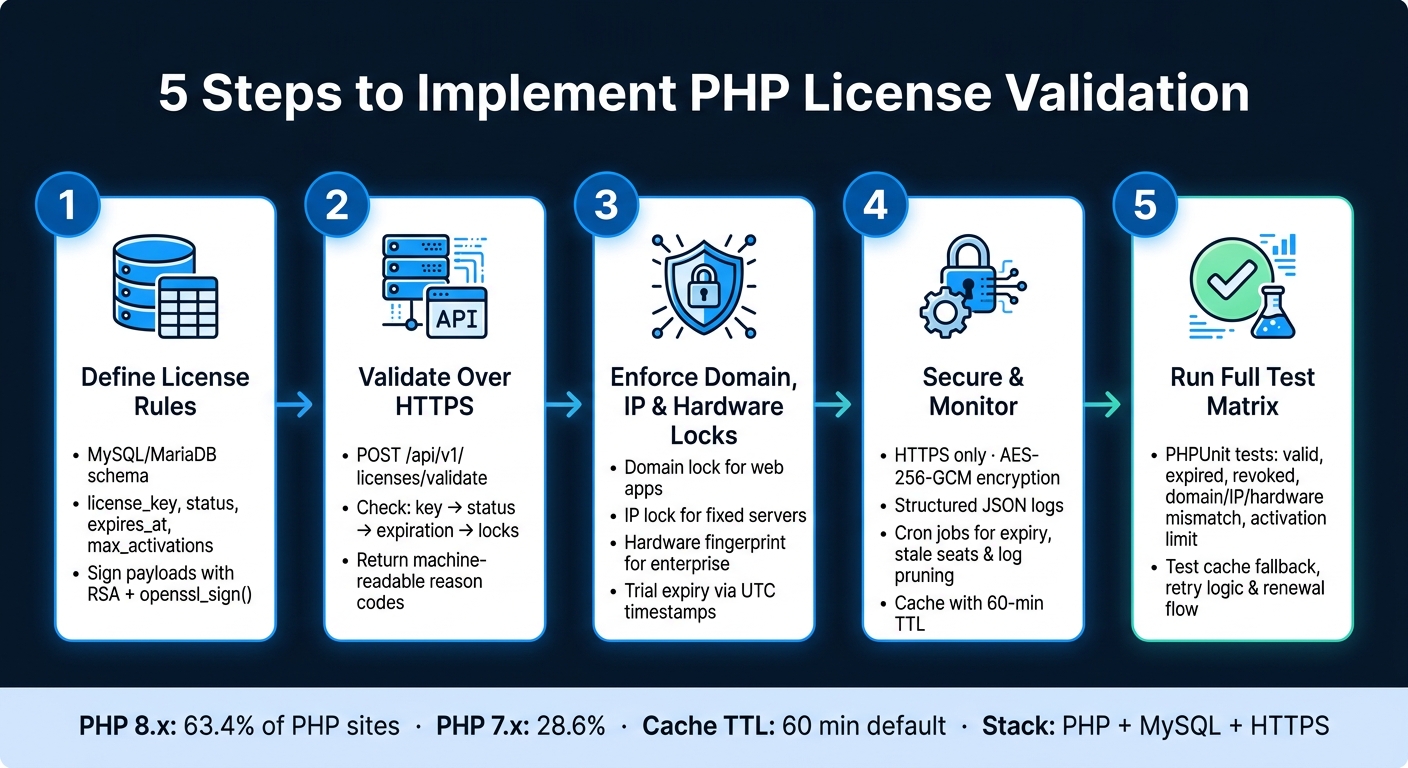
5 Steps to Implement PHP License Validation
Quick Comparison
| Step | What I’d build | Main goal |
|---|---|---|
| 1 | License table and key format | Define the rules |
| 2 | PHP validation endpoint + client call | Check the license at runtime |
| 3 | Domain, IP, hardware, and trial checks | Enforce install limits |
| 4 | HTTPS, signatures, logs, and protected code paths | Make bypassing harder |
| 5 | Test matrix for valid, expired, revoked, and cache cases | Catch bugs before release |
What I like about this process is that it stays simple: check the license, cache the answer, and fail with a clear reason code when something is wrong. That gives you a clean way to control paid PHP software on servers you do not own.
sbb-itb-f54f501
Step 1: Design the License Model and Store License Data
Before you write any validation code, nail down what the license is supposed to control. That starts with the data model. In plain terms, the fields you store become the rules your validation endpoint will check in Step 2.
Choose the License Fields That Control Access
At a minimum, each license record should include a license key, product ID, status, created date, expiration date, and max activations.
Each field has a clear role:
- The license key is what the customer enters in the app.
- The product ID separates editions like
plugin_basicandapp_pro, so each can follow its own rules. - The status field, such as
active,suspended, orrevoked, lets you shut off access from one central place without changing the code already out in the wild.
Suspended is temporary. Revoked is permanent.
Use status to control access, and use expiration to handle time limits. If you're dealing with trials, store the start and end dates in UTC. Only format them as m/d/Y when you show them to users.
Add lock fields only if the setup calls for them. Those fields should match the checks you'll enforce later.
Create a MySQL or MariaDB License Table
The schema below covers what a validation endpoint needs, without piling on extra data that never gets used:
| Column | Type | Notes |
|---|---|---|
license_key |
VARCHAR, UNIQUE | Primary lookup field; must be indexed |
product_id |
VARCHAR, INDEX | Identifies the product or edition |
status |
ENUM | active, suspended, revoked |
license_type |
ENUM | perpetual, subscription, trial |
created_at |
TIMESTAMP (UTC) | Audit trail for when the license was issued |
expires_at |
TIMESTAMP (UTC), nullable | Null for perpetual; required for trials and subscriptions |
max_activations |
INT | How many environments can activate this key |
activation_count |
INT | Current active installations |
allowed_domain |
VARCHAR, nullable | Domain lock; null means no restriction |
allowed_ip |
VARCHAR, nullable | IP lock; null means no restriction |
hardware_fingerprint |
VARCHAR, nullable | Hardware lock for on-premise deployments |
customer_id |
INT, INDEX | Links to a separate customers table |
Put a unique index on license_key so lookups stay fast. Add secondary indexes on product_id and customer_id to make admin-side queries easier.
Keep billing info and support notes in a separate customers table. Your validation endpoint should return a lean payload - only what the app needs to decide whether access is allowed.
That gives you one place to read every access rule.
Generate Keys and Sign License Payloads
Once the record structure is set, the next job is protecting it from tampering.
Generate license keys on the server with random_bytes(), then encode them into something readable, like ABCD-1234-EFGH-5678. Skip easy-to-mix-up characters like O and 0, or I and 1. Before saving a new key, check the database for collisions. With secure randomness, collisions are very unlikely, but the extra check is cheap and worth doing. The client should never generate its own keys.
To stop people from changing license data after issuance, sign the payload on the server with openssl_sign() and a private RSA key. The JSON payload should include the license fields you care about. Then embed the matching public key inside the shipped app and verify the payload with openssl_verify() on every validation call. If signature verification fails, reject the license right away.
Store the private key outside the webroot and lock down its file permissions.
"To protect against local date changes for trial versions of your protected scripts there is an option for time checking using atomic online time servers." - SourceGuardian
SourceGuardian PRO also supports dynamic licensing, which lets you generate licenses during checkout and assign different lock options per customer.
With the license data defined and signed, Step 2 can validate it safely over HTTP.
Step 2: Build the PHP Validation Endpoint and Connect the Client
Build the validation endpoint first. Then connect the distributed app so it calls that endpoint before anything else runs.
Write the Validation Logic in a PHP Endpoint
Your endpoint should accept a POST request with a JSON body over HTTPS. At a minimum, send:
license_keydomainipproduct_idfingerprintfor hardware-locked deployments, when used
Keep the route stable and versioned, like POST /api/v1/licenses/validate. That way, client code won't break when you change server-side logic later.
On the server, check the license in a strict sequence: key, status, expiration, then locks. Stop on the first failure and return right away. That keeps the flow simple and makes the result easy for the client to handle.
Here’s the core logic:
$stmt = $db->prepare("SELECT * FROM licenses WHERE license_key = :key LIMIT 1");
$stmt->execute([':key' => $licenseKey]);
$license = $stmt->fetch(PDO::FETCH_ASSOC);

if (!$license) {
    echo json_encode(['valid' => false, 'reason' => 'not_found']); exit;
}

if ($license['product_id'] !== $productId) {
    echo json_encode(['valid' => false, 'reason' => 'product_mismatch']); exit;
}

if ($license['status'] === 'suspended') {
    echo json_encode(['valid' => false, 'reason' => 'suspended']); exit;
}
if ($license['status'] !== 'active') {
    echo json_encode(['valid' => false, 'reason' => 'revoked']); exit;
}

if (!is_null($license['expires_at'])) {
    $now     = new DateTimeImmutable('now', new DateTimeZone('UTC'));
    $expires = new DateTimeImmutable($license['expires_at'], new DateTimeZone('UTC'));
    if ($now > $expires) {
        echo json_encode(['valid' => false, 'reason' => 'expired']); exit;
    }
}

if (!empty($license['allowed_domain']) && $domain !== $license['allowed_domain']) {
    echo json_encode(['valid' => false, 'reason' => 'environment_mismatch', 'detail' => 'domain']); exit;
}
if (!empty($license['allowed_ip']) && $ip !== $license['allowed_ip']) {
    echo json_encode(['valid' => false, 'reason' => 'environment_mismatch', 'detail' => 'ip']); exit;
}
if (!empty($license['hardware_fingerprint']) && $fingerprint !== $license['hardware_fingerprint']) {
    echo json_encode(['valid' => false, 'reason' => 'environment_mismatch', 'detail' => 'hardware']); exit;
}

echo json_encode([
    'valid'            => true,
    'reason'           => 'ok',
    'expires_at'       => $license['expires_at'],
    'license_type'     => $license['license_type'],
    'max_activations'  => $license['max_activations'],
    'activation_count' => $license['activation_count'],
]);
Use machine-readable reason codes like not_found, product_mismatch, revoked, suspended, expired, and environment_mismatch. That gives the client a clean way to react without guessing from message text.
For a successful response, send only what the app needs:
validreasonexpires_atlicense_typemax_activationsactivation_count
Keep that same response shape in the app-side cache too. It makes local and remote validation behave the same, which saves headaches later.
Call the Endpoint from the Distributed Application
On the client side, put the validation call in a single LicenseValidator class. Run it from bootstrap.php, or from the framework’s earliest entry point, before any app logic starts. If you wait until later, unlicensed users may still reach parts of the app.
Use cURL with a short timeout, like 5 seconds, so a slow license server doesn’t drag down every request:
$ch = curl_init('https://license-api.example.com/api/v1/licenses/validate');
curl_setopt_array($ch, [
    CURLOPT_RETURNTRANSFER => true,
    CURLOPT_POST           => true,
    CURLOPT_HTTPHEADER     => ['Content-Type: application/json'],
    CURLOPT_POSTFIELDS     => json_encode($payload),
    CURLOPT_TIMEOUT        => 5,
]);
$response = curl_exec($ch);
curl_close($ch);
$result = json_decode($response, true);
You also don’t want to hit the endpoint on every page load. A small cache goes a long way here. Cache a successful response locally with a short TTL. 60 minutes is a solid default. If the app may run in partly offline settings, you can stretch that to 24 hours.
Store the cached JSON in a local file such as storage/license_cache.json and include a checked_at timestamp. On startup, read the cache first. Only call the remote endpoint if the cache is missing or expired.
If the remote call fails but a valid cache still exists, fall back to that cache instead of blocking the user right away. That gives you some breathing room when the network is flaky. But there’s an important catch: cached revoked or expired results should still block access. The cache is there to reduce lookups and soften short outages, not to let blocked licenses keep running.
When validation fails, respond to the reason code directly:
- Block execution for
revoked,suspended,not_found, andproduct_mismatch - For
expired, block access and prompt renewal; show the expiration date in U.S. format - For
environment_mismatch, show a plain message that tells the user which lock failed: domain, IP, or hardware
If you want to hide request building and response parsing, SourceGuardian can encode the LicenseValidator class; see the SourceGuardian documentation for implementation details.
Use this validation result as the gate for domain, IP, hardware, and trial enforcement in the next step.
Step 3: Enforce Domain, IP, Hardware, and Trial Limits
Use the Step 2 response to run local checks before you load any premium code.
Pick the Right Lock for Each Deployment Type
Match the lock to the deployment. Don’t overcomplicate it. The smallest lock that does the job is usually the right one.
Domain locking fits websites, CMS plugins, and web apps. Read the host from $_SERVER['HTTP_HOST'] or $_SERVER['SERVER_NAME']. Then normalize it to lowercase and strip www. and any port suffix before you compare values.
IP locking makes more sense for fixed server installs, like dedicated VPS instances, internal company apps, or API services where the IP stays the same. For server-side IP checks, use $_SERVER['SERVER_ADDR'], not $_SERVER['REMOTE_ADDR'].
Hardware fingerprinting relies on a stable hashed server ID built from the same machine identifiers on every install. It’s best when the machine itself is the thing you want to bind to. The tradeoff is simple: if hardware changes or a VM moves, you may need to reissue the license.
Use the tables below to pick the smallest lock that fits the deployment.
Handle Trial and Subscription Expiration at Runtime
Once the environment matches, apply the time limit.
Store and compare dates in UTC with DateTimeImmutable. Don’t rely on the local server clock for trial checks. If someone rolls the clock back, they can stretch a trial longer than intended.
Compare the current UTC time against the stored activation and expiration timestamps. Block access before activation. Allow access before expiration. After expiration, apply the rule for the trial or subscription.
Log the license_id, UTC timestamp, expiration timestamp, and the outcome.
Compare Lock Types and License Terms
Table 1: Lock Type Comparison
| Lock Type | Use Case | Strengths | Limitations |
|---|---|---|---|
| Domain | Websites, CMS plugins, web apps | Survives server migrations; easy for end users | Requires careful subdomain and alias handling |
| IP Address | Fixed server installs, internal tools | Hard to spoof in controlled networks | Breaks with dynamic IPs, load balancers, or provider changes |
| Hardware / Fingerprint | Enterprise apps, kiosk systems | Tied to the physical machine; hardest to clone | Hardware upgrades or VM migrations require license reissue |
Table 2: License Term Comparison
| License Type | Renewal Behavior | Common Expiry Pattern | Validation Rule |
|---|---|---|---|
| Perpetual | No renewal required for core use | No expiration date | Check environment lock and revocation status only |
| Subscription | Periodic renewal, monthly or yearly | Fixed calendar end date | Compare current UTC time against expiration timestamp; apply grace period or block |
| Trial | Converts to paid or stops functioning | Fixed duration from activation, such as 14 or 30 days | Enforce activation timestamp plus trial length; use authoritative time to prevent clock rollback |
After the runtime rules work, harden the validation path.
Step 4: Harden the Workflow
Protect the Validation Path Against Tampering
Once runtime checks are in place, the next job is to harden the path that runs them.
This validation path gets attacked more than any other part of a license system. In most cases, attackers go after two weak spots: they try to intercept license data while it's moving, or they patch the code so the check never runs at all. So the goal here is simple: block interception and make patching much harder.
Use HTTPS only. Validate the TLS certificate in cURL, and reject any plain-HTTP request. Keep license payloads signed, then verify the signature before you trust or use the data. Store keys and tokens outside your source code, using environment variables or encrypted config files. In the database, encrypt sensitive license fields at rest with AES-256-GCM and log only truncated identifiers.
In the code itself, put an APP_INIT guard at the top of critical modules. If that constant isn't set, exit right away. And don't stop at a single startup check. Re-validate the license in high-value paths like premium feature controllers, admin operations, and billing actions, using a short-TTL cached result. A boot-time check alone leaves too much room for abuse.
SourceGuardian can encode the loader and validation files so tampering is harder.
Once this path is locked down, the next step is to make sure you can watch it and keep it easy to run over time.
Keep Logs, Run Housekeeping, and Plan for Growth
Log every license check, whether it passes or fails. Each entry should include the license_id, an event type like validation_success, domain_mismatch, or signature_invalid, the client fingerprint, a result code, and a UTC timestamp. Don't log full license keys. Use only the last 4–6 characters as a truncated identifier.
Structured JSON logs are a good fit here. They're easy to search in centralized logging tools, and they make odd patterns stand out fast, like repeated failures from one IP or a sudden drop in check volume after a deployment.
Store created_at, expires_at, and last_validated_at in UTC. When you show dates in dashboards or customer emails, convert them to the right U.S. time zone and format them as MM/DD/YYYY with a 12-hour clock, such as 09/07/2026 3:45 PM ET.
Set up cron jobs to handle routine cleanup and status work:
- Run a daily UTC job during off-peak hours to mark licenses past their
expires_atdate as expired and queue renewal notifications. - Run a weekly job to flag activations that haven't checked in for 90 days as stale, which frees inactive seats in subscription models.
- Run a monthly log-pruning job to delete audit entries older than 365 days or archive them to cold storage, so table sizes stay under control and queries stay fast.
Keep synchronous validation endpoints lean. That means fast database lookups, signature checks, and simple rule handling. Push bulk work like status updates and renewal emails into background jobs with a queue.
As traffic grows, move validation into a dedicated service with its own database and cache. That split also makes it easier to add Redis or APCu caching for frequently accessed license records without changing the main application.
These logs and scheduled jobs make the full test pass in Step 5 much easier to verify.
Step 5: Test the Full License Flow Before Release
Once hardening is done, run a full test pass before release.
This is the step people skip, and it's often where small bugs sneak into production. A cached result can hide a revoked license. A stale response can let an expired key slip through. That's the kind of stuff that looks fine in staging, then causes a mess later.
Test the same rules enforced in Steps 1–4: status, expires_at, lock fields, and max_activations. And for each case, check the same reason codes returned by the validator.
Test Valid, Expired, Revoked, and Mismatched Licenses
Build a test matrix that covers each license outcome. For every scenario, define the input payload, the expected reason code, and what the app should do. Then run those cases as automated PHPUnit tests against your staging license server.
| Scenario | Expected reason |
Application Behavior |
|---|---|---|
| Valid, active license | ok |
Initializes normally, all features enabled |
| Expired license | expired |
Blocks access; shows renewal notice |
| Revoked license | revoked |
Always blocks; logs event at high severity |
| Domain mismatch | environment_mismatch + detail: domain |
Blocks with domain mismatch message |
| IP mismatch | environment_mismatch + detail: ip |
Blocks with IP mismatch message |
| Hardware mismatch | environment_mismatch + detail: hardware |
Blocks; shows "This license is bound to another machine." |
| Activation limit hit | ACTIVATION_LIMIT_REACHED |
Blocks; prompts user to deactivate another device or upgrade |
Test both matching and non-matching domain, IP, and hardware IDs. For activation limits, set max_activations to 2, register from three environments, and confirm the third attempt is blocked.
Keep reason codes stable and documented. That way, support can look at logs and tell what went wrong without guessing.
If you're using SourceGuardian to encode your loader and validation files, run this same matrix against the encoded builds too. Encoding should not change runtime behavior. The reason codes and error messages should stay the same.
Check Cache, Retry, and Renewal Behavior
Use the Step 4 cache behavior as your baseline. Run the cache test in sequence:
- successful validation and cached result
- forced outage
- cache fallback during the TTL window
- block or restricted mode after TTL expires
Also confirm that the cache still respects expires_at. A cached result must never let the app keep running past the license expiry date.
For retry logic, test HTTP 500, HTTP 503, timeout, and malformed JSON responses from the license server. Each endpoint failure should log a distinct code such as VALIDATION_ENDPOINT_UNAVAILABLE.
Don't let the client quietly accept a partial response with a missing expires_at. Treat that as a failure.
Treat renewal as both a cache-update test and a date-change test. Start with a license that expires today in UTC. Confirm the pre-renewal warning appears in U.S. format, for example: "Your license will expire on 09/07/2026."
Then extend expires_at on the server and trigger a new validation. Check that the response shows the new expires_at, returns a reason of ok, and that the app removes any earlier restrictions.
One more thing: make sure the updated result is not held back by a stale cache. Keep the TTL short enough so users see the change on the next validation cycle.
If you're testing a trial-to-paid conversion with SourceGuardian's dynamic licensing, include a case where all trial limits disappear after the next validation.
Conclusion: A Five-Step PHP License System That Works
A PHP license system works best when you treat it like a release control setup, not just a one-off key check.
There are five core parts: define the license, store it cleanly, validate it over a secure path, enforce it at runtime, and test it before release. Put together, those steps give you a system you can control instead of a loose process that only checks whether a key looks valid.
The main upside is controlled distribution. You decide which customer can run what, where they can run it, and how long access lasts. And because that all runs on data you can query, you can use it for renewals, seat limits, and support calls without a bunch of guesswork.
On the customer side, the experience stays smooth. Legitimate users get low friction through cache TTLs, outage tolerance, and clear expiration messages.
If your team ships PHP code to customer-owned servers, this workflow also fits well with script protection. SourceGuardian can add code protection and licensing controls for distributed PHP scripts.
You don't need a huge stack to do this. PHP, MySQL or MariaDB, and HTTPS are enough to build a license system that's strict when someone tries to abuse it and simple for legitimate customers.
FAQs
How often should my app recheck a license?
License validation runs automatically at runtime. SourceGuardian also includes online time verification, which helps confirm that the license is still valid and guards against local date changes.
So rather than setting up a manual recheck schedule, rely on these built-in checks. Then use monitoring and logging to flag validation failures or unauthorized attempts as they happen.
What should happen if the license server is down?
If license verification fails because the server can't be reached, show a clear message that tells the user what happened and what to do next. Skip jargon. Plain language works better here.
For example, say that the app couldn't check the license because it couldn't connect to the verification server. Then point the user to the next step, such as checking their internet connection, trying again in a few minutes, or signing in with the account tied to their purchase. If they don't have a license yet, include a simple path to buy the full version.
It also helps to give confirmed customers a fallback option. That might be temporary access for a set period while the app tries to verify again later. This keeps paying users from getting locked out just because of a network problem.
On the back end, log failed validation attempts so your support team can tell the difference between a normal connection issue and a pattern that may point to misuse. Include details like the time of the failure, the device or account involved, and the error returned by the server request.
Which lock type should I use for my PHP app?
Use domain locking for most public web apps because it ties execution to the hostname.
If you deploy to a fixed dedicated server, use a single IP lock. For on-prem or private infrastructure where machines should not be swapped, use hardware locking.
For cloud setups or networks that change, go with IP restrictions using CIDR ranges instead of one IP. For higher-risk use cases, pair project-wide locking with environment locks.