

SourceGuardian vs. ionCube: Encoding Comparison
When it comes to protecting PHP code, SourceGuardian and ionCube are two of the most popular encoding tools. Both transform PHP source code into secure bytecode, but they differ in features, compatibility, and pricing. Here's a quick breakdown:
- SourceGuardian: Best for PHP 8.5 support, hardware-level locking (like Machine ID), and trial protection via Atomic Time Server Checks. Offers a single tool for all locking features, including IP, domain, and MAC address.
- ionCube: Ideal for shared hosting environments due to pre-installed loaders. Excels in dynamic runtime encryption and CI/CD integration with its specialized editions.
Quick Comparison
| Feature | SourceGuardian 17 | ionCube Encoder 15 |
|---|---|---|
| PHP Version Support | PHP 4.x–8.5 (full) | PHP 5–8.4 syntax, 8.5 runtime |
| IP/Domain Locking | Yes | Yes (Pro and above) |
| Machine ID Locking | Yes | No |
| Dynamic Key Encryption | No | Yes |
| Trial Protection | Atomic Time Server Check | No |
| Non-PHP File Encoding | Yes | Yes |
| Entry-Level Price | $249 | $249 |
| Full Licensing Price | $399 (PRO) | $369–$429 (Pro/Cerberus) |
Choose SourceGuardian if you need PHP 8.5 support, advanced locking features, or protection for non-PHP files. Opt for ionCube if you prioritize hosting compatibility, dynamic encryption, or CI/CD workflows.
SourceGuardian Overview
SourceGuardian is a PHP encoding and encryption tool designed specifically for commercial PHP applications. It works by converting PHP source code into binary bytecode and layering it with encryption, ensuring the original code remains unreadable without the appropriate loader installed on the server. This makes it a go-to solution for developers looking to secure their PHP applications effectively.
Key Features of SourceGuardian
SourceGuardian offers robust protection options by allowing developers to bind scripts to specific identifiers, such as IP addresses, domains, MAC addresses, or machine IDs. These identifiers are integrated into the encryption key, adding an extra layer of security.
Its licensing system is dynamic and highly adaptable. With a built-in license generator accessible via both a graphical interface and the command line, developers can seamlessly integrate licensing into e-commerce platforms. It also supports trial management by allowing time-limited access or setting expiration dates.
"SourceGuardian for PHP can also easily produce trial versions of your scripts by setting an expiry date for your PHP scripts or by limiting the number of days that your protected script will work." - SourceGuardian
For larger applications, the tool includes a project-wide locking feature. This ensures that all protected files work as a cohesive system - if an unencoded file is introduced, the entire application will stop functioning. Additionally, SourceGuardian can encode non-PHP files, such as HTML templates, which can only be decrypted by protected scripts.
Supported Platforms and PHP Versions
SourceGuardian 17 is compatible with PHP versions ranging from 4.x to 8.5. The encoder itself works on Windows, macOS, and Linux, while loaders are available for all major server environments:
| Environment | Supported Configurations |
|---|---|
| Windows | 32-bit and 64-bit |
| Linux | x86_64, armhf, aarch64 |
| macOS | Intel and Apple Silicon (M-series) |
| FreeBSD | x86_64, aarch64 |
One standout feature is its cross-platform compatibility. Scripts encoded on macOS, for example, can run on Linux or FreeBSD without needing to be re-encoded. Dedicated loaders are available for Thread Safety PHP installations, and there are specialized loaders for Swoole-cli (PHP 8.1 x86_64).
"A script encoded under one operating system will run under any other supported operating systems." - SourceGuardian
This flexibility makes SourceGuardian a strong choice for developers needing reliable cross-platform deployment.
Use Cases for SourceGuardian
SourceGuardian is widely used in various deployment scenarios. For instance:
- Tupiweb: Protects webmail systems across more than 90 countries.
- Vision Gate Portal: Secures its "Vision Gate Fusion" platform, which supports around 500 subscription-based membership websites.
- Web Sudoku: Handles 250,000 unique daily visitors while relying on SourceGuardian for its commercial applications.
Additionally, SourceGuardian works seamlessly with popular frameworks like Laravel (including pre-compiled Blade templates), WordPress plugins, Symfony, Nette, and Phar archives. To make adoption easier, loaders can be distributed at no cost alongside encoded applications, ensuring end users do not incur additional expenses.
ionCube Overview
ionCube has been a trusted name in PHP encoding since its launch in 2002. It secures PHP applications by converting source code into obfuscated bytecode using a process called Compiled-Code-Translation. This method mirrors PHP's internal compilation but adds an extra layer of security.
"ionCube encoding uses Compiled-Code-Translation that turns scripts into bytecode, similar to the form that PHP normally compiles scripts into before execution, but modified for extra security." - ionCube
To execute encoded files, servers need the free ionCube Loader extension. The Loader Wizard simplifies the process by identifying the correct loader for the server environment. This encoding tool offers robust protection, making it a go-to solution for developers handling sensitive PHP applications.
Key Features of ionCube
ionCube does more than just encode PHP code - it takes security to the next level with features like Dynamic Key Encryption, which generates unlimited runtime encryption keys without embedding them in the encoded files. It also obfuscates variable, function, and class names, making reverse engineering significantly harder.
"Only ionCube offers Dynamic Key encryption where you can add a theoretically unlimited number of custom algorithmic encryption keys to give your code the highest level of protection." - ionCube
These features provide comprehensive security for commercial PHP applications. Licensing controls vary across editions, catering to different developer needs:
- Pro ($369) and Cerberus ($429) editions allow script locking to specific IPs, domains, or time frames, with Cerberus adding MAC address-based licensing.
- CI editions (starting at $476) are tailored for continuous integration workflows, including remote license management and automatic reallocation every 24 hours if a session fails.
- The Basic edition ($249) offers bytecode protection but lacks licensing controls.
| Edition | Price | IP/Domain/Time Licensing | MAC Licensing | CI Support |
|---|---|---|---|---|
| Basic | $249 | No | No | No |
| Pro | $369 | Yes | No | No |
| Cerberus | $429 | Yes | Yes | No |
| Pro CI | $476 | Yes | No | Yes |
| Cerberus CI | $549 | Yes | Yes | Yes |
Platform and PHP Version Compatibility
ionCube ensures flexibility across various server environments. Version 15 of the ionCube Encoder supports PHP syntax up to version 8.4, while the latest loaders extend runtime compatibility to PHP 8.5 for files encoded for PHP 8.2, 8.3, or 8.4. The encoder is available for Windows, macOS, Linux, and FreeBSD. Windows and macOS users benefit from a GUI, while Linux and FreeBSD editions are CLI-only.
Encoded scripts are platform-agnostic, meaning files encoded on one operating system can run on any supported platform without re-encoding. For developers targeting multiple PHP versions, ionCube allows bundling several encoded file sets into a single package, ensuring compatibility across a wide range of server setups.
Use Cases for ionCube
ionCube is a favorite among commercial PHP software vendors who need to distribute applications to customer-controlled servers without exposing the source code. It’s a reliable choice for protecting proprietary business logic, securing embedded credentials, and implementing subscription or trial-based licensing.
Michael Stauber from Solarspeed.net shares:
"The ability to ship code without revealing intellectual property or means and methods has allowed us to streamline the distribution of our code."
Oleg R., Founder of Mersibo Technologies, adds:
"For projects where we employ a time-based billing model, ionCube's time-limited license provision proves invaluable in safeguarding our revenue streams."
Additionally, ionCube supports offline distribution, making it ideal for PHP-based software shipped on physical media like USB drives, especially in environments where internet access is unavailable.
SourceGuardian vs. ionCube: Feature Comparison
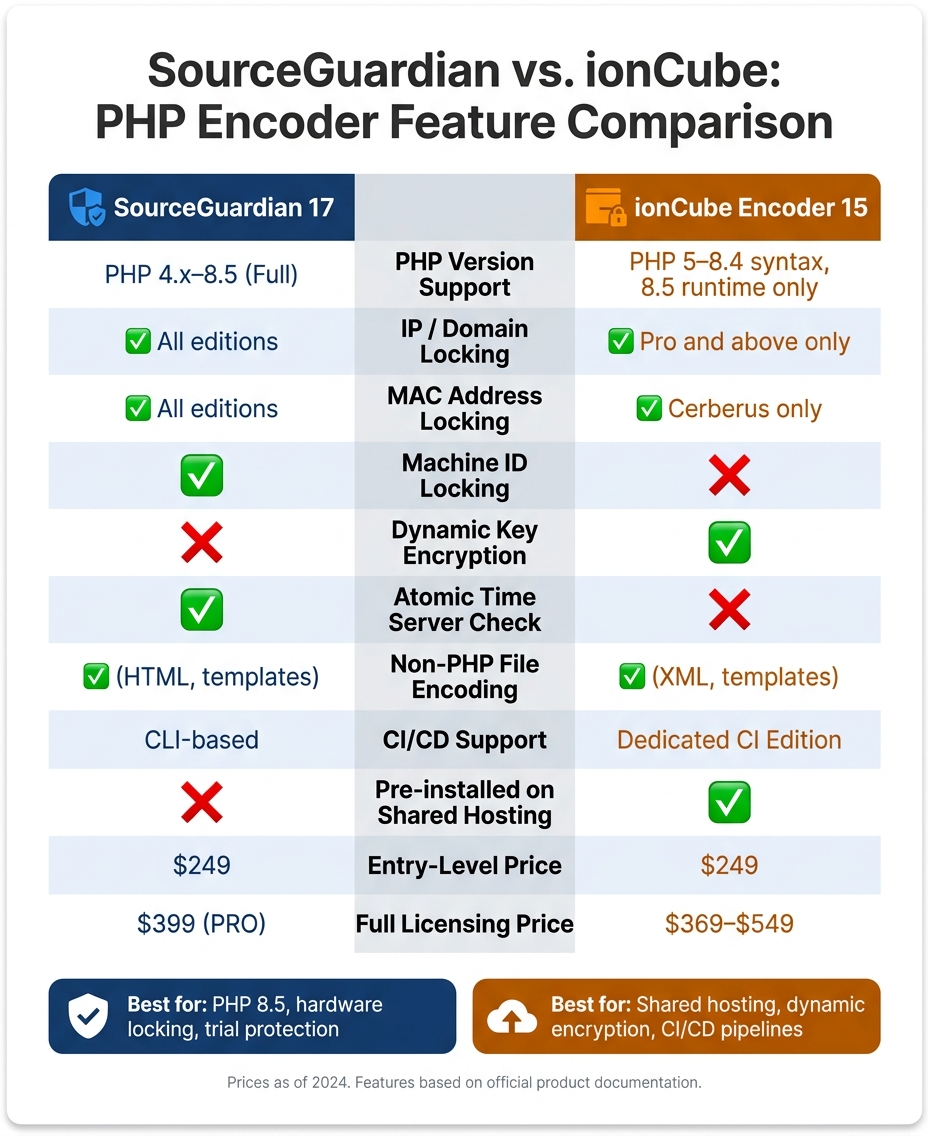
SourceGuardian vs. ionCube: PHP Encoder Feature Comparison
Compare both tools' features side by side to reveal key differences and overlaps.
Feature and Capability Comparison Table
| Feature | SourceGuardian 17 | ionCube Encoder 15 |
|---|---|---|
| PHP Version Support | PHP 4.x, 5.x, 7.x, 8.x (full PHP 8.5 support) | PHP 5, 7, 8 (up to 8.4 syntax; 8.5 runtime only) |
| Encoder OS | Windows, macOS, Linux | Windows, macOS, Linux, FreeBSD |
| Loader OS | Windows, Linux, macOS, FreeBSD | 10+ platforms (Windows, Linux, macOS, FreeBSD, etc.) |
| IP / Domain Locking | Yes | Yes (Pro and above) |
| MAC Address Locking | Yes | Yes (Cerberus only) |
| Machine ID Locking | Yes | No |
| Atomic Time Server Check | Yes | No |
| Dynamic Key Encryption | No | Yes |
| Non-PHP File Encoding | HTML templates and other files | XML and templates |
| CI/CD Support | CLI-based automation | Dedicated CI Edition ($476–$549) |
| Pricing (entry-level) | $249 (Standard) | $249 (Basic) |
| Pricing (full licensing) | $399 (PRO) | $369–$429 (Pro / Cerberus) |
Reading the Comparison
The table above provides a snapshot of the distinctions between SourceGuardian and ionCube. Let’s dive into some of the most critical differences to help with decision-making.
When it comes to security, the two tools take different paths. SourceGuardian uses cryptographic methods to tie scripts to specific environments, such as a target domain or IP address. On the other hand, ionCube employs Dynamic Key Encryption, which generates runtime keys for added protection.
"Only ionCube offers Dynamic Key encryption where you can add a theoretically unlimited number of custom algorithmic encryption keys to give your code the highest level of protection." - ionCube
SourceGuardian also offers a unique feature called Atomic Time Server Check, which prevents users from bypassing trial expirations by manipulating their system clock. This can be a game-changer for developers concerned about trial abuse.
For CI/CD workflows, ionCube stands out with its dedicated CI Edition. This version includes tools for license reallocation and temporary activation/deactivation, making it well-suited for complex pipelines. SourceGuardian, while not offering a dedicated CI edition, supports automation through CLI-based tools, which can handle most pipeline requirements.
Loader compatibility is another key area to consider. ionCube loaders are pre-installed on most major hosting platforms, including cPanel, Plesk, and DirectAdmin. This widespread compatibility is a significant advantage, as noted by Matthew Rosenblatt, Owner of ClubUptime:
"ioncube is very widely supported -- any major web hosting company will have it enabled by default -- so it offers you the greatest compatibility."
SourceGuardian loaders, while covering essential platforms like Windows, Linux, macOS, and FreeBSD, also include specific builds for Thread Safety PHP installations, offering flexibility for developers working in specialized environments.
These differences highlight the strengths of each tool, setting the stage for a deeper discussion on selecting the best PHP encoding solution for your needs.
sbb-itb-f54f501
Choosing the Right PHP Encoding Solution
Factors to Consider
When selecting a PHP encoding solution, it's important to weigh factors like deployment environment, licensing complexity, and the PHP version you're targeting. For shared hosting environments, ionCube loaders are often pre-installed, making deployment much simpler for users with limited technical expertise. On the other hand, SourceGuardian loaders may require manual installation. While this isn't an issue for tech-savvy customers, it can create challenges for a broader, less technical audience. As Al, a retired Web Hosting Talk moderator and developer, aptly stated:
"While you might be comfortable with the php.ini, your customers likely won't be. What you are looking for is a solution that gets your customers up and running with as little fuss as possible."
To make an informed decision, align these considerations with the specific features offered by each encoder, as outlined in the feature comparison above.
When to Choose SourceGuardian
SourceGuardian stands out for its granular hardware locking and readiness for PHP 8.5. It’s the only encoder that includes Machine ID locking as part of its standard package, so there's no need to pay extra for this added layer of protection. Additionally, its Atomic Time Server Check is a unique feature that prevents users from tampering with their system clock to bypass trial periods.
For those working with PHP 8.5, SourceGuardian 17 provides full encoding support. In contrast, ionCube 15 only supports PHP 8.5 at the runtime level, meaning it doesn't allow encoding files using PHP 8.5 syntax.
SourceGuardian is also ideal if you need to encode non-PHP files, such as HTML templates, or if you want a single tool that bundles all locking features - IP, domain, MAC address, and Machine ID - without requiring an upgrade. The PRO version ($399) adds even more functionality, including dynamic licensing and CI/CD integration, making it a comprehensive solution for commercial software vendors.
Depending on your needs, SourceGuardian's advanced locking capabilities may tip the scales in its favor, especially for users prioritizing security and flexibility.
When to Choose ionCube
If broad hosting compatibility is your priority, ionCube is the better choice. Its loaders are pre-installed on many hosting platforms, significantly reducing deployment friction for products like WordPress plugins, PHP-based SaaS scripts, or any software aimed at shared hosting environments.
Another advantage of ionCube is its integrated cloud licensing portal, available as part of its Online Licensing add-on. This feature provides a ready-to-use interface for managing users and license allocations. For smaller software businesses that lack the resources to build a custom licensing system, this can be a game-changer.
For teams running automated build pipelines, the Cerberus CI Edition ($549) is worth considering. It combines support for CI/CD workflows with advanced locking features like MAC address-level protection.
Ultimately, your decision will depend on whether you prioritize SourceGuardian's robust security features or ionCube's ease of deployment and licensing tools.
Conclusion and Key Takeaways
Summary of Key Points
To wrap things up, let's revisit the main findings from our comparison:
Both ionCube and SourceGuardian excel at protecting PHP source code through bytecode compilation and encryption. The real differences lie in their deployment scenarios and levels of control. For example, ionCube stands out for its compatibility with shared hosting environments, while SourceGuardian provides native support for PHP 8.5 and includes Machine ID locking as a standard feature. These distinctions stem directly from the detailed feature comparisons and deployment scenarios we've explored.
Final Recommendations
Here's a quick reference table to match each tool with its ideal use case:
| Priority | Better Fit |
|---|---|
| Widest shared hosting compatibility | ionCube |
| Native PHP 8.5 encoding support | SourceGuardian |
| Managed cloud licensing portal | ionCube |
| Machine ID locking without an upgrade | SourceGuardian |
| Atomic time server for trial protection | SourceGuardian |
| Dedicated CI/CD pipeline edition | ionCube |
These points can help guide your decision based on your specific requirements.
For users prioritizing seamless deployment on shared hosting, ionCube is likely the better choice. On the other hand, if you need advanced hardware-level security, up-to-date PHP compatibility, or protection for non-PHP files, SourceGuardian has the edge. Ultimately, your decision should align with your deployment environment, security needs, and licensing workflow.
FAQs
Which encoder is easier to deploy on shared hosting?
SourceGuardian is often simpler to set up on shared hosting environments. Its loaders are available at no cost and don’t need an encoder license. All you have to do is install the appropriate PHP extension loader that matches the server's operating system and PHP version, and the protected scripts will work without any issues.
Can I encode PHP 8.5 syntax, or only run on PHP 8.5?
SourceGuardian 17 is fully compatible with PHP 8.5. This means you can encode scripts using PHP 8.5 syntax and features, and those encoded files can run seamlessly on servers using PHP 8.5. Just make sure the SourceGuardian loader for PHP 8.5 is installed on your server to execute the protected files properly.
What’s the best way to prevent trial users from changing the server clock?
To prevent trial users from sidestepping expiration dates by changing their system clock, SourceGuardian includes a feature for verifying time through atomic online time servers. You can set this up in your project settings by specifying at least two servers, such as pool.ntp.org, to ensure consistent access. During script execution, the system will check these servers, and at least one must be reachable to validate the current date.



