

How to Secure Secrets in PHP CI/CD Pipelines
A single leaked CI/CD token can lead to bad deploys, data loss, or cloud account abuse. If I want to keep PHP pipeline secrets safe, I focus on four things: know every secret, keep it out of Git, inject it only when needed, and watch logs and access after setup.
Here’s the short version:
- I list every secret by owner, environment, use, and rotation date
- I keep production secrets away from feature branches and shared jobs
- I remove secrets from code,
.envfiles, CI YAML, Docker build args, and Composer auth files - I use runtime secret stores or CI secret settings instead of hardcoding values
- I prefer short-lived cloud credentials with OIDC over long-lived access keys
- I mask job output, cut noisy debug logs, and scan PRs for hardcoded secrets
- I test rotation in staging first, then review access logs for odd reads or failed attempts
A few numbers make the risk plain. In one scan, 12% of Laravel apps had an exposed .env file. And in 2024, more than 12 million secrets were found in public GitHub repos. That means this is not a rare edge case. It’s a common failure point.
If I had to boil the whole article down to one rule, it would be this: treat every secret as short-term, limited-use, and easy to replace. That mindset makes the rest of the process much safer.
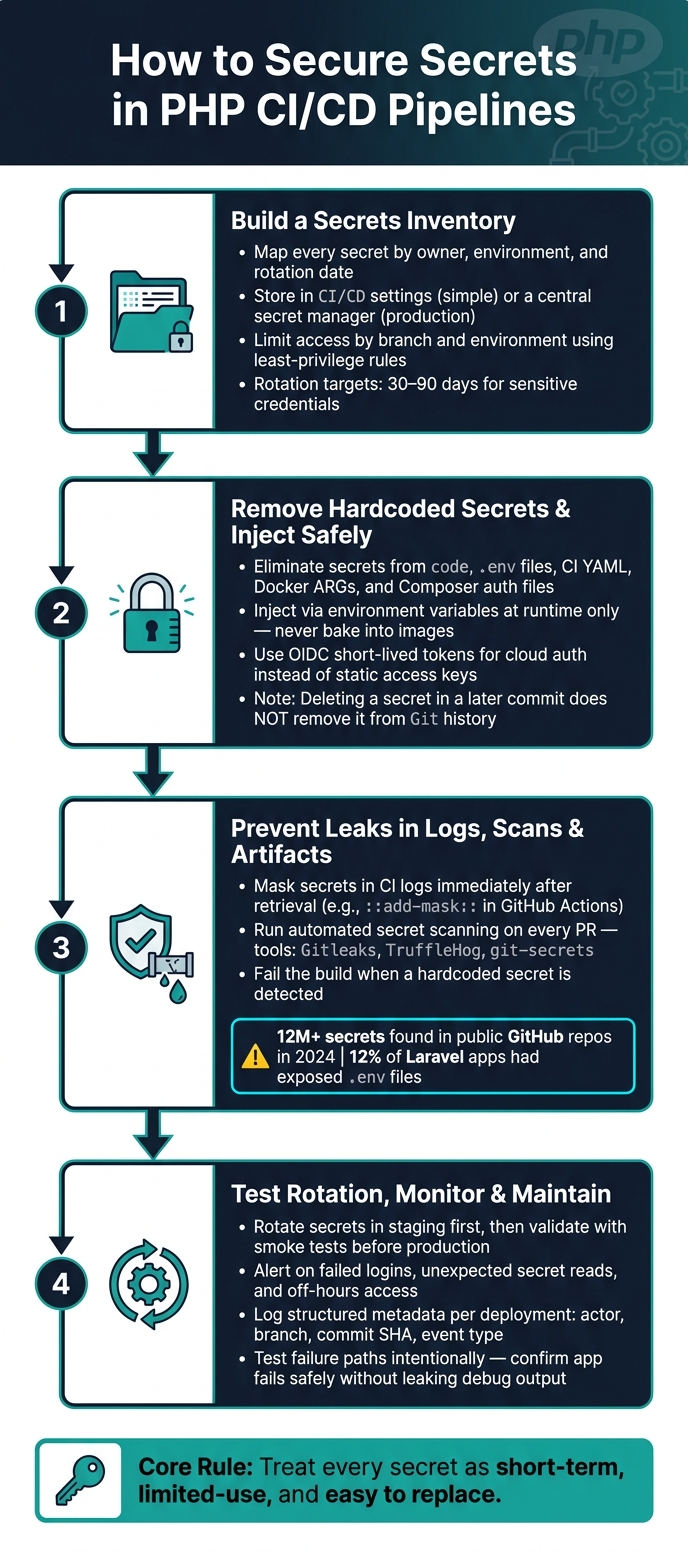
How to Secure Secrets in PHP CI/CD Pipelines: 4-Step Framework
CI/CD Security Tutorial | Why GitHub Secrets Don’t Fully Protect You
sbb-itb-f54f501
Quick Comparison
| Area | What I do | Main goal |
|---|---|---|
| Secret storage | Use CI secrets for simple cases, secret managers for production | Keep secrets out of code and Git |
| Secret access | Limit by branch, environment, and job | Stop lower-trust jobs from reading production values |
| Secret injection | Pass at runtime or step-level only | Cut leak risk in builds and artifacts |
| Cloud auth | Use OIDC and short-lived tokens | Avoid static cloud keys |
| Leak prevention | Mask logs and scan PRs | Catch spills before merge or deploy |
| Rotation | Test in staging, then roll out | Avoid app breakage during secret changes |
| Monitoring | Review audit logs and odd access patterns | Spot misuse early |
Below, the article walks through those steps in order, using PHP, Laravel, Composer, Docker, GitHub Actions, and GitLab CI examples.
Step 1: Build a Secrets Inventory and Decide Where Each Secret Will Live
Start with a secret inventory.
List Secrets by Environment, Owner, and Usage
Map each secret to an owner, environment, and rotation schedule. You don't need anything fancy at first. A simple table does the job.
Here’s a practical starter template for a PHP project:
| Secret Name | Purpose | Environment | Usage | Owner | Rotation |
|---|---|---|---|---|---|
DB_PASSWORD |
Production Database Access | Production | Runtime | DevOps Lead | 90 days |
STRIPE_SECRET |
Payment Processing | Staging | Runtime | Finance/Dev | 180 days |
COMPOSER_AUTH |
Private Package Access | CI/Build | Build-time | Lead Developer | Yearly |
APP_KEY |
Laravel Encryption | Production | Runtime | CTO | On incident |
DEPLOY_SSH_KEY |
Server Deployment | Production | Build-time | DevOps | 60 days |
The environment column matters more than it might seem.
Development credentials should use non-production values that cannot touch production. Staging credentials should match the production setup, but point to isolated resources. Production should have the tightest controls. That split keeps a small mistake in dev or staging from turning into a much bigger mess.
Store Secrets in CI/CD or a Central Secret Manager
Once you have the inventory, decide where each secret should live.
Platform-native secrets in GitHub Actions or GitLab CI are fast to set up. They work well for simple workflows and non-production environments. But for production credentials and shared services, a central secret manager such as AWS Secrets Manager or HashiCorp Vault is usually the better fit.
It takes more setup, sure. But you get stronger isolation, rotation support, and audit logs. When something goes wrong, that paper trail can save a lot of time.
Set Least-Privilege Access and Rotation Rules
After placing each secret, lock down access and set a rotation deadline.
In GitHub Actions, use environment-level secrets so only workflows running on a protected branch like main can read production values. In GitLab, do the same with protected CI/CD variables scoped to protected branches. A feature-branch runner should never be able to touch a production credential.
Set rotation targets now, before an incident forces the issue. Aim for every 30 to 90 days for highly sensitive credentials like deploy keys and database passwords. If some secrets still can't be rotated with automation, put a quarterly review on the calendar and assign a named owner. Also track creation and last-modified dates. That makes it much easier to spot orphaned secrets and remove them.
Step 2: Remove Hardcoded Secrets and Inject Them Safely into PHP Builds and Deployments
Once you’ve finished the inventory, the next move is simple: get secrets out of code and pipeline files. After that, pass them in only through controlled runtime or build-time channels.
Remove Committed Secrets from Code, Config, and Pipeline Files
The usual problem spots are easy to miss because they often look “normal†in day-to-day work. Watch for things like:
- Hardcoded database credentials inside PDO connections
- API keys in PHP config arrays
- Plaintext values in Git-tracked
.envfiles - Composer
auth.jsonfiles that hold private repo credentials - Secrets written directly in CI YAML files
Here’s the part teams often underestimate: deleting a secret in a later commit does not remove it from Git history. The value can still be recovered. If a secret was committed at any point - even for a moment - treat it as compromised. Revoke it and rotate it right away, even if the commit was removed later or the history was rewritten.
For Dockerfiles, don’t pass secrets with ARG or ENV. Those can end up in image layers, which is exactly what you want to avoid. Use BuildKit secret mounts instead so the values never get baked into the image. If your PHP deploy still needs values during the build, treat them as step-only inputs, not as image data.
Pass Secrets to PHP Through Environment Variables and Runtime Configuration
In PHP, load secrets at runtime from $_SERVER or $_ENV, then map them into your framework config during bootstrap.
That part matters even more in long-running setups like FrankenPHP or RoadRunner. In those cases, stick with $_SERVER or $_ENV and avoid putenv().
It also helps to keep the scope tight. Give each secret only to the job step that needs it, and fail fast when a required value is missing or malformed. That’s one of those small habits that saves a lot of pain later.
If you’re on Laravel 9+, there’s another option: .env files can be encrypted with php artisan env:encrypt, and the decryption key can be injected through CI/CD. After that, the next job is making sure those values don’t show up in logs, scans, or release artifacts.
Use Short-Lived Credentials and Federated Identity When Available
For cloud deployment steps that interact with AWS, GCP, or Azure, OIDC is much safer than storing long-lived access keys in CI/CD settings.
The flow is pretty clean. Your CI/CD platform asks for a short-lived JWT during the job. The cloud provider checks the token claims, such as the repository name and organization, then issues temporary credentials that expire when the job ends. If a token leaks, the damage window is much smaller. And because there are no static keys sitting around, there’s nothing to stash, rotate by hand, or leak by accident.
In GitHub Actions, set permissions: id-token: write in the workflow YAML and use aws-actions/configure-aws-credentials to assume the role. In GitLab CI, define id_tokens in .gitlab-ci.yml and exchange the token with aws sts assume-role-with-web-identity.
Step 3: Prevent Leaks in Logs, Scans, and Build Artifacts
After secrets are injected safely, the next job is simple: stop them from slipping out somewhere else. The usual weak spots are logs, scans, and release artifacts.
Mask Secrets in Logs and Limit Verbose Debug Output
Most CI/CD platforms will hide marked secrets as ***. That helps, but there's a catch: masking usually works only on the exact string. If that same secret shows up as Base64, URL-encoded text, or even a partial value, it can still leak.
That matters most for secrets pulled during a job. Say your workflow grabs a value from AWS Secrets Manager in the middle of a run. In GitHub Actions, you should register that value for masking right away with echo "::add-mask::$VALUE" - before any later step prints env state or debug output.
A few habits go a long way here:
- Pass secrets through
stdin, not command-line arguments - Never run
phpinfo()in CI or deployment jobs - If you need to confirm a secret is present, log the length of the value, not the value itself
Once logs are under control, the next risk is code that already contains hardcoded credentials.
Add Secret Scanning to Pull Requests and Pipeline Runs
In 2024, more than 12 million secrets were found in public GitHub repositories. That number tells the story. Manual review won't cut it.
The practical move is automated scanning in pull requests and pipeline runs, so secrets get caught before they land in the main branch.
Tools like Gitleaks, TruffleHog, and git-secrets plug into PR checks and CI jobs without much fuss. The key setting is this: fail the build when a hardcoded secret is found. A warning on its own is easy to scroll past. A blocked merge gets attention.
Here’s a quick reference:
| Scanning Stage | Tool Examples | Primary Goal |
|---|---|---|
| Pre-commit | detect-secrets, git-secrets |
Stop secrets before they leave the developer's machine |
| Pull Request | Gitleaks, TruffleHog, GGShield | Catch credentials in new code before merging to the main branch |
If you distribute PHP code itself as part of a release, there’s one more place to lock down: the build output.
Protect Distributed Releases
If your pipeline ships PHP code to customers, add SourceGuardian to encode the release package and lock it to the intended domain, IP, or hardware.
Step 4: Test Rotation, Monitor Access, and Keep the Process Working
Once secrets are injected safely and shielded from leaks, the next step is simple: make sure rotation, access rules, and alerts still hold up under production-like conditions.
Validate Secret Rotation in Staging Before Production
Rotate the secret in your store, deploy to staging, and confirm PHP is using the new value before anything reaches production. Run smoke tests against /health to make sure database and queue access still work with the updated credential.
If your app loads secrets through a systemd EnvironmentFile, plan for a full service restart instead of a reload. Otherwise, the new values may not be picked up. The same check applies to CLI processes, including cron jobs and artisan commands. If the web app gets the rotated secret but background workers do not, failures can show up later and feel random.
It’s also smart to test the failure path on purpose. Set an invalid or missing secret in staging and confirm the application fails loudly and safely, without spilling debug output. A validation script in bootstrap/app.php or a service provider can verify required environment variables at startup.
One caution specific to Laravel: rotating
APP_KEYrenders existing encrypted sessions, cookies, and encrypted database columns unreadable, so that rotation needs a separate plan.
After rotation is working, shift your attention to access patterns. Who is reading secrets, and when?
Review Audit Logs and Alert on Unusual Secret Usage
Watch for failed logins, unexpected secret reads, unapproved production changes, and access outside normal hours. Also keep an eye on repeated reads by non-deployment jobs or requests coming from IP addresses you don’t expect.
During deployment runs, add structured metadata to the job summary, such as:
- actor
- event type
- branch
- commit SHA
That gives you a lightweight audit trail without adding much overhead.
Conclusion: Key Controls for Secure PHP CI/CD Secrets
Keep secrets working by rotating them in staging first, monitoring access for odd behavior, and limiting production credentials to approved jobs and protected branches.
FAQs
How often should I rotate CI/CD secrets?
Rotate secrets on a regular schedule. Set calendar reminders or, better yet, automate the process when you can. For tighter security, use short-lived credentials like OIDC or dynamic secrets. They expire on their own, which cuts down the risk if one gets exposed.
As part of a secure deployment strategy, SourceGuardian also recommends rotating encryption keys on a regular basis.
When should I use OIDC instead of static keys?
Use OpenID Connect (OIDC) instead of static keys whenever you can. Long-lived credentials are a headache waiting to happen. They can slip into build logs or sit on a runner filesystem longer than anyone wants.
OIDC takes a safer route. Your CI/CD pipeline swaps a short-lived token for temporary, granular access. That means zero-standing privileges and a much smaller blast radius if something gets exposed, since the token expires on its own when the job finishes.
What should I do if a secret was committed to Git?
If a secret gets committed to Git, treat it as compromised.
Deleting the file alone won't fix it. The secret can still live in the repository history, which means other people - or automated tools - may still find it.
First, revoke and rotate the credential right away.
After that, clean the repository history to remove the secret. It also helps to add pre-commit hooks like Gitleaks so you can catch this stuff before it lands in Git.



