

How PHP Bytecode Encoding Protects Scripts
If you ship PHP code to other servers, plain source files are easy to read, copy, and edit. Bytecode encoding lowers that risk by turning PHP into Zend opcodes, wrapping them in encryption, and loading them through a server extension at runtime.
Here’s the short version:
- Plain PHP is exposed on disk. If someone gets file access, they can read app logic, patch license checks, or copy the product.
- Bytecode is harder to read, not impossible to crack. Opcode dumps and runtime analysis can still reveal logic.
- Encoding adds more friction. It combines compiled bytecode with encryption and obfuscation, so direct inspection gets much harder.
- Loaders matter. The protected file only runs when the right PHP loader extension is installed.
- Extra locks help. Domain, IP, MAC, machine ID, and time-based limits can stop code from running in the wrong place.
- It’s a deterrent, not perfect secrecy. One research effort recovered source from 10 protected PHP apps across 1 million lines of code.
- It can affect workflow. You need to scan and test code before encoding, since protected code is harder to inspect later.
- SourceGuardian pricing starts at $249.00 for Standard and $399.00 for PRO, with PRO adding more license automation.
If I had to sum it up in one line: PHP bytecode encoding helps protect distributed code from casual theft and tampering, but it does not hide anything that must be decrypted in memory to run.
Protect Your Laravel Code: A Guide to PHP Obfuscators for Enhanced Security
sbb-itb-f54f501
Quick Comparison
| Approach | What you ship | What people can see | Main limit |
|---|---|---|---|
| Plain PHP source | Readable .php files |
Almost everything | Easy to copy or edit |
| Plain bytecode | Compiled opcodes | Less readable, but still inspectable | Dump tools can still show logic |
| Encoded bytecode | Encrypted payload + loader | Much less on disk | Runtime analysis can still recover code |
I’d frame the article this way: it explains how PHP moves from source code to opcodes, where encoding fits into that process, what it blocks, what it does not block, and how SourceGuardian applies these controls in day-to-day deployment. For more details on protection mechanisms, see our PHP Encoder security FAQs.
How PHP Compiles Code Into Bytecode
Bytecode is the compiled form that PHP runs. It gets there through a set pipeline.
From Source Code to Zend Opcodes
When PHP processes a source file, it goes through four stages. First, the lexer reads the raw text and splits it into tokens like T_ECHO and T_VARIABLE. Next, the parser uses those tokens to build an Abstract Syntax Tree (AST), which is a structured version of the code.
After that, the compiler turns the AST into opcodes. These are low-level instructions stored in an opcode array that the Zend VM can run. Last, the Zend Virtual Machine reads those opcodes and executes them.
PHP opcodes include instructions like ASSIGN, ECHO, and JMPNZ. Each instruction stores one result and up to two inputs. Opcache keeps compiled opcodes in memory, so later requests can skip tokenization, parsing, and compilation. That makes execution easier for PHP, but by itself, it doesn't do much to protect the code.
Plain PHP vs. Precompiled Bytecode
Once PHP turns code into opcodes, the key issue becomes simple: what can still be read, copied, or changed?
Plain source code is readable text. Bytecode is compiled instructions. In practice, that means bytecode is a binary opcode stream, not something people are meant to read directly. But that doesn't make it safe on its own. Tools like the Vulcan Logic Dumper (VLD) can still dump and show those opcodes.
So bytecode alone is not a security fix. Encoding takes this compiled form and adds obfuscation and encryption around it, which can be done using an online PHP encoder.
| Feature | Plain Source Files | Precompiled Bytecode |
|---|---|---|
| Readability | Fully human-readable | Binary format; not meant for direct reading |
| Security and tamper resistance | None; trivial to edit, copy, or remove license checks | Limited without encryption; reversible with analysis tools, but modifications typically break checksums or encryption |
For developers using modern frameworks, specific configurations are often required, such as when encoding Symfony projects to handle annotations correctly.
How Bytecode Encoding Protects PHP Scripts
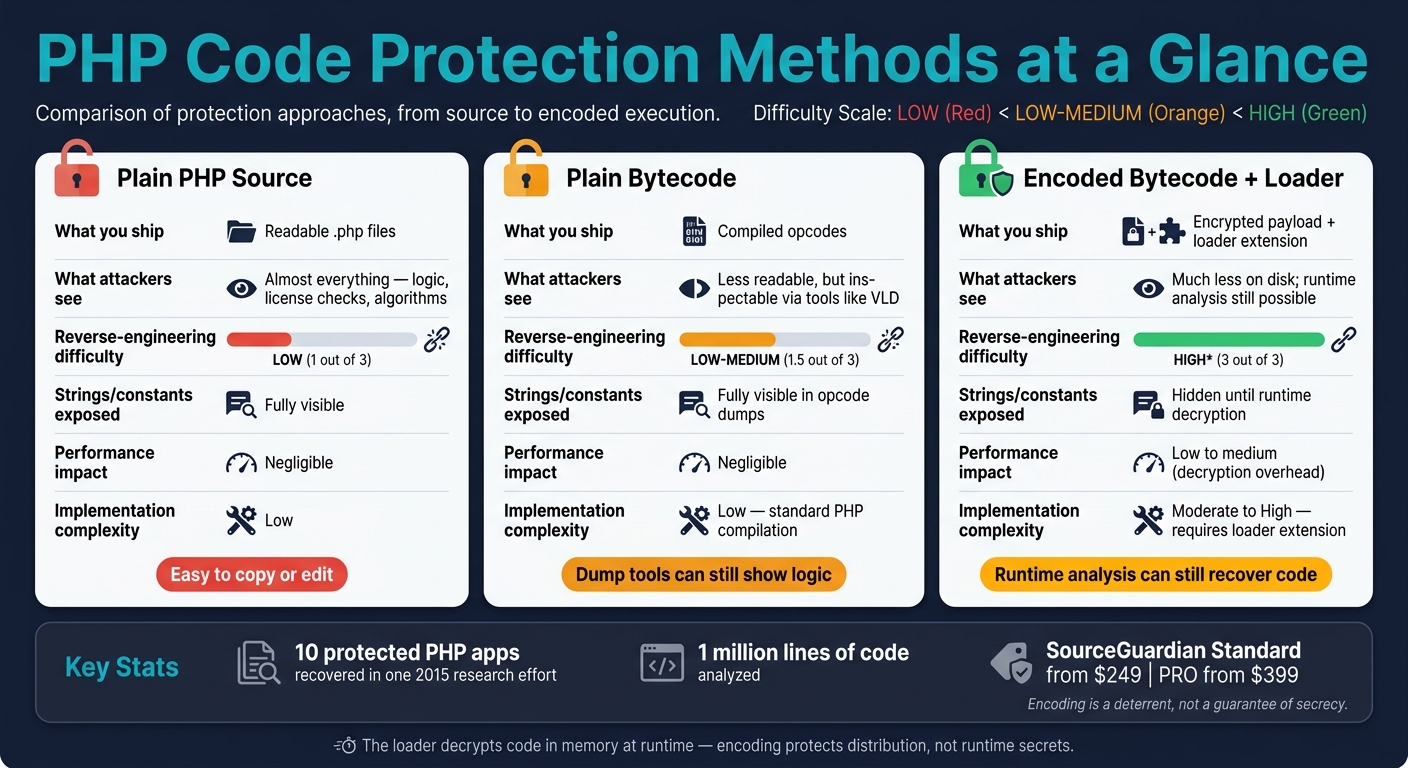
PHP Code Protection Methods: Plain Source vs. Bytecode vs. Encoded Bytecode
Bytecode Compilation, Encoding, and Runtime Loading
Once PHP generates opcodes, encoding adds the protection layer before deployment. PHP first compiles the code into opcodes. The encoder then wraps that output into an encrypted payload for protected runtime loading. In practice, that means the code is packed into an encrypted binary payload that runs through a PHP extension, which decrypts it in memory.
"Our PHP encoder protects your PHP code by compiling the PHP source code into a binary bytecode format, which is then supplemented with an encryption layer." - SourceGuardian
The loader works as a server-side PHP extension. When the script runs, it decrypts the bytecode directly in memory and hands it to the Zend engine for execution. The original logic never sits on disk in readable form. As researcher Chris Lyne noted: "The input to sg_load(), containing encrypted bytecode, would not be dumped because it does not need to be compiled."
From there, obfuscation makes the protected bytecode harder to rebuild or study.
Why Obfuscation and Encryption Add Stronger Protection
Plain bytecode can still be dumped and inspected. Encryption changes that in a big way. Advanced encoders may alter control flow, swap opcodes, and rewrite operands so any recovered logic points in the wrong direction. The loader restores those affected instructions only while the code is being executed, then returns them to their obfuscated state right after, which makes memory dumping tougher. It can also strip or zero out line numbers, so mapping runtime errors back to specific logic blocks becomes much harder.
What This Protects Against in Real Deployments
These protections matter most when code leaves your hands and lands on client, partner, or production servers. For software vendors and businesses shipping PHP applications, bytecode encoding cuts down a few common risks.
| Threat | How Encoding Reduces It |
|---|---|
| Unauthorized redistribution | Protected files need the correct loader extension to run, so copied files do not work on another server without it |
| License check tampering | Encrypted control flow makes it harder to find and bypass license validation logic |
| Proprietary logic exposure | Business rules, algorithms, and internal workflows are hidden from direct inspection |
| Source-based vulnerability discovery | It removes the easy path of reading plain PHP to spot exploitable flaws |
That said, encoding is not a magic shield. It makes reverse engineering harder, not impossible. Security researchers have shown that with advanced static and dynamic analysis, protected code can still be recovered. In one 2015 research effort, they recovered source code from 10 protected PHP applications totaling 1 million lines of code. What encoding does well is block casual copying, quick edits, and direct source inspection.
Next, compare these protections with their limits and where deeper layers help.
Security Benefits, Tradeoffs, and Advanced Protection Layers
Bytecode hides source code, but the stronger move is to put more than one control around it.
What Bytecode Protection Improves and What It Cannot Guarantee
Bytecode encoding removes the most obvious weak point: readable source code sitting on a server. Without encoding, anyone with file access can copy, change, or study the logic. With encoding, they run into bytecode that takes more work to inspect. After the loader decrypts the code in memory, the issue shifts. At that point, the question is simple: how much work would an attacker still need to do?
Research shows that protected PHP bytecode can still be recovered with advanced static and dynamic analysis, so encoding increases the work involved instead of promising secrecy. That extra work is often enough to stop most attackers.
There’s a catch, though. Encoding also hides flaws from static scanners, so you need to audit code before you encode it.
Encryption Layers, String Hiding, and Tamper Checks
These controls matter most when scripts leave your server and run in customer or partner environments. That’s where plain bytecode often isn’t enough.
Environment locking ties decryption to a domain or IP, which stops the file from running somewhere else.
"The domain name is used as a part of the key for encryption, so protected scripts may not be decrypted and run from another domain. This is very powerful." - SourceGuardian
Project locking ties protected files to the original encoded set, which blocks file substitution.
Atomic online time servers enforce expiration and resist clock rollback.
Comparing Protection Approaches
Each approach gives you a different tradeoff between easy setup and stronger resistance to inspection or tampering.
| Protection Approach | Reverse-Engineering Difficulty | Strings and constants exposed | Performance Impact | Implementation Complexity |
|---|---|---|---|---|
| Plain Bytecode | Low - easy to dump | Fully visible in opcode dumps | Negligible | Low - standard PHP compilation |
| Bytecode + Encryption | Medium - requires intercepting the loader during runtime decryption | Hidden until runtime decryption | Low to medium - initial decryption overhead | Moderate - requires a loader extension |
| Bytecode + Custom Handlers | High - requires runtime hooking | Obfuscated - operands de-obfuscated just in time | Medium - overhead from custom handler logic | High - requires runtime hooking |
The next step is deciding which layers match your deployment and licensing model.
How SourceGuardian Applies Bytecode Encoding in Practice

Core Protection Features for PHP Applications
In day-to-day use, those protection layers turn into a loader-based process for encoding, locking, and runtime decryption. SourceGuardian packages PHP into encrypted bytecode, then uses a loader to decrypt it when the code runs.
It supports PHP 4.x through PHP 8.4, and deployment locks can limit scripts to a specific IP address, domain name, LAN hardware (MAC) address, or machine ID. SourceGuardian can also encode HTML templates and other non-PHP files, so only the protected project can use them.
After the code is protected, licensing controls determine where it can run and under what conditions.
Licensing, Trials, and CI/CD-Friendly Workflows
Trial builds can expire on a set date or after a fixed number of working days. To help stop simple expiration workarounds, SourceGuardian checks the current date against atomic online time servers.
The PRO license generator works in both the GUI and CLI, which makes it a good match for automated release pipelines.
SourceGuardian Editions and Deployment Options
Standard and PRO mainly differ in the amount of automation and licensing control a team needs.
| Feature | SourceGuardian Standard | SourceGuardian PRO |
|---|---|---|
| U.S. Pricing | $249.00 | $399.00 |
| Bytecode Protection | Included | Included |
| Interface Options | GUI & Command Line | GUI & Command Line |
| Dynamic Licensing | No | Yes |
| CI/CD Support | Basic | Advanced / Automated |
| Deployment Locks | IP, Domain, MAC, Date | IP, Domain, MAC, Date, Machine ID |
Both editions run on Windows, Linux, and macOS. The loader also extends deployment to FreeBSD.
Standard makes sense for teams that encode code manually before each release and don't need automated license generation. PRO fits better when builds are automated, licenses must be generated on demand, or the deployment model includes commercial distribution to end customers.
Conclusion: When PHP Bytecode Encoding Is the Right Protection Layer
PHP bytecode encoding makes the most sense when you ship scripts outside your own infrastructure. It takes PHP’s normal compile step and turns it into a protection layer, then adds encryption and obfuscation to make reverse engineering harder. That said, it’s still a deterrent, not a perfect shield, because protected applications can still be analyzed by intercepting zend_execute.
When commercial distribution also calls for access control, SourceGuardian adds deployment locks and licensing on top of encoding. That extra layer makes bytecode protection more useful for software vendors that need to control access after deployment.
The practical takeaway is simple: use bytecode encoding to make copying and tampering harder, and pair it with deployment controls when commercial licensing is part of the job. Since the loader still has to decrypt code in memory, encoding protects distribution, not secrets that must exist at runtime. Within those limits, it’s a strong protection layer for PHP applications distributed outside your infrastructure.
FAQs
Is PHP bytecode encoding secure enough?
Yes. PHP bytecode encoding is a strong way to protect code. It makes unauthorized access, reverse engineering, and tampering much harder and more expensive.
Here’s the basic idea: it converts readable PHP scripts into unreadable bytecode. Some tools can also add extra layers of encryption, which makes the code even harder to inspect or alter.
SourceGuardian is a good example. It can lock protected scripts to a specific domain, IP address, or hardware. The Pro version also includes bytecode entangling, which adds another barrier for anyone trying to pull the code apart.
It’s not foolproof - nothing is. But for commercial script protection, it’s a widely trusted option.
Can encoded PHP still be reverse engineered?
Yes. Encoded PHP scripts are turned into bytecode and protected with encryption, which makes the code underneath much harder to read, though not impossible to reverse engineer.
The catch is simple: the code still has to be decrypted and executed at runtime. So a determined attacker can study how it runs or lean on debugging tools to inspect behavior. SourceGuardian makes that job harder with protections like bytecode entangling and randomization.
When should I use SourceGuardian?
Use SourceGuardian when you need to protect your intellectual property from unauthorized access, copying, or modification. It works well for developers and businesses that distribute software and want to keep control over how people use it.
Common uses include:
- Restricting scripts to specific IPs, domains, or hardware
- Creating time-limited trial versions
- Managing license-based access
- Securing sensitive logic or settings across a project



