

Dynamic Licensing in Cross-Platform PHP Encoding
If you encode PHP code but skip runtime license checks, you protect the files, not the usage. That is the core point here.
I’d break it down like this: encoding hides the source, while dynamic licensing decides who can run it, where it can run, and for how long. In this setup, I can update, renew, or revoke access without re-encoding the app, which matters when the same PHP product runs on Windows, Linux, macOS, FreeBSD, VMs, shared hosting, or containers.
Here’s the short version:
-
Encoding and licensing do different jobs
- Encoding protects the PHP source and bytecode.
- Licensing controls runtime use.
-
Dynamic licensing checks rules at runtime
- Expiration date
- Domain or IP match
- Hardware binding
- License integrity
- Scheduled re-checks with a license server
-
Cross-platform deployment changes the license plan
- Linux and macOS use
.soloaders - Windows uses
.dllloaders - Each PHP version, CPU type, and thread-safety mode needs the right loader
- Containers and shared hosting often need different lock choices than dedicated servers
- Linux and macOS use
-
Lock type should match the server setup
- Domain lock: best for shared hosting and many site-based apps
- IP lock: fits fixed-IP systems
- Hardware lock: fits fixed machines and appliances
- Time limit: works for trials and subscriptions
-
Dynamic licensing helps after deployment
- Convert trials to paid plans
- Extend subscriptions
- Revoke copied installs
- Handle billing-driven renewals
A few hard facts stand out in the article:
- SourceGuardian Standard is $249
- SourceGuardian PRO is $399
- PHP support runs from PHP 4.x through PHP 8.4
- A grace window of 3 to 7 days can reduce customer lockouts during renewal or server changes
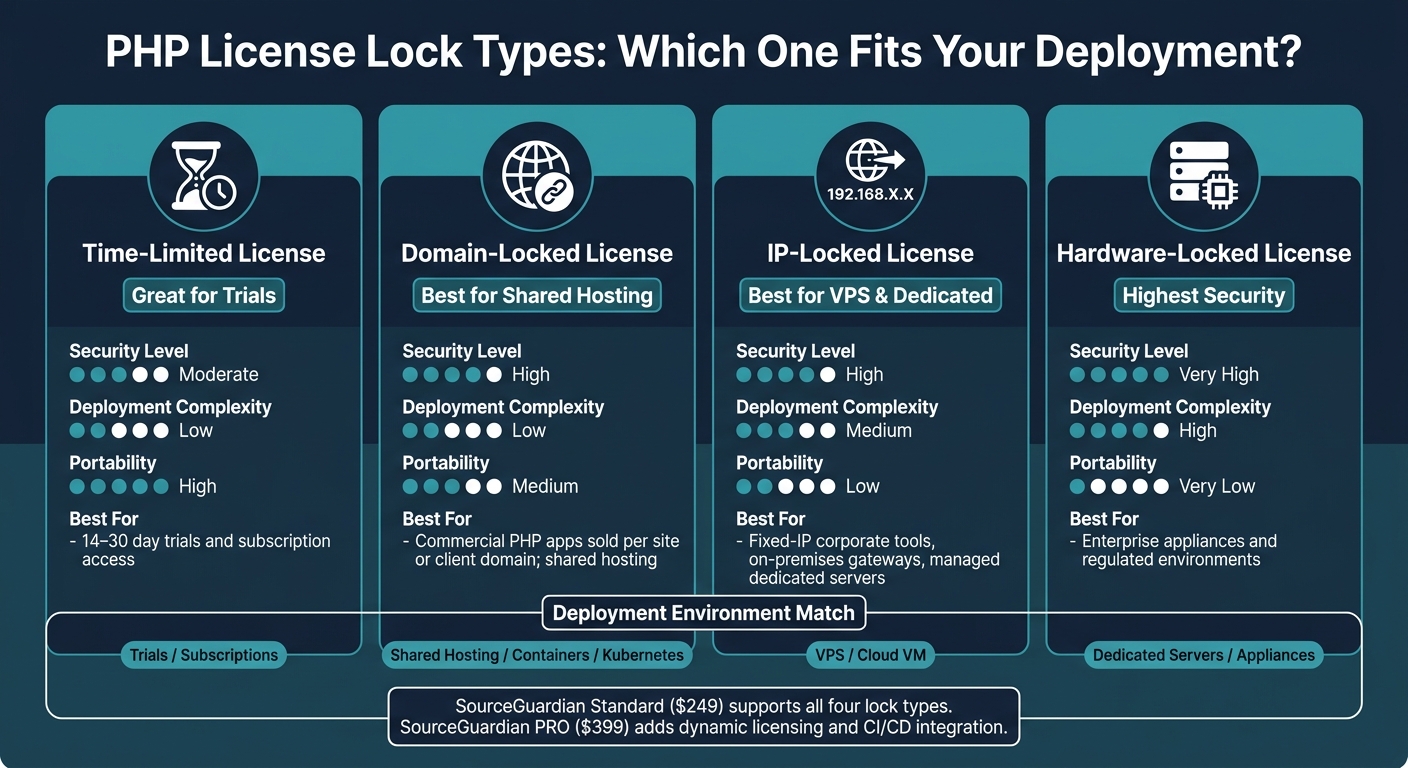
PHP License Lock Types: Choosing the Right Model for Every Deployment
Quick comparison
| Topic | Main point |
|---|---|
| Encoding | Protects the PHP code itself |
| Dynamic licensing | Enforces usage rules at runtime |
| Static license | Fixed after delivery, less control later |
| Dynamic license | More control after delivery, supports renewals and revocation |
| Shared hosting | Domain locks are usually the safer pick |
| VPS / dedicated | IP or hardware locks often fit better |
| Containers | Domain locks or short-lived server-issued tokens tend to work better |
If I had to sum up the full article in one line, it would be this: pick a lock type that matches the hosting setup, then use runtime license checks to control access without shipping new encoded files each time.
sbb-itb-f54f501
2. How Dynamic Licensing Works in Encoded PHP Applications
The workflow has five parts. Each one handles a different step in the licensing process, from file protection to runtime enforcement. At runtime, the flow comes down to four main pieces: encoded files, the loader, the license file, and, in some setups, a license server.
Core parts of the licensing workflow
Start with the file, then the loader, then the license check.
Encoded PHP files protected by an encryption layer are the starting point. These files can carry embedded metadata that tells the runtime which license rules to enforce, like the allowed domain or the expiration date.
The loader is a PHP extension installed on the customer's server. When an encoded file runs, the loader checks the server environment, loads the license, validates it, and only then runs the bytecode if everything passes.
"The Loader is required because source code is encoded with bytecode binary protection. The loader does the decrypting of the bytecode and runs it." - SourceGuardian
The license file - often license.sg - sits next to the encoded files. It usually includes the expiration date, binding data such as a domain or hardware fingerprint, and feature flags that decide which parts of the application are turned on. Its signature also helps detect tampering.
An optional license server can issue, renew, and revoke licenses. The loader may check back with it on a set schedule, which is useful for subscriptions and other time-based plans.
Static licenses vs. dynamic licenses
The main difference is how much control you keep after deployment.
| Aspect | Static Licenses | Dynamic Licenses |
|---|---|---|
| Setup effort | Low - a pre-generated license ships with the product | Higher - requires license generation and delivery workflow |
| Update flexibility | Low - changes usually require a new license file per installation | High - renew or replace licenses without touching encoded files |
| Trial support | Basic - fixed expiry baked into the license file | Flexible - trials can convert, extend, or downgrade |
| Offline use | Fully supported | Supported, with optional periodic online checks |
| Control over copied deployments | Limited - enforcement relies on the original bindings | Stronger - server-side revocation and revalidation can catch misuse |
"If you lock your files to your license file, generate licenses either online or offline for your customers then this will be the best method of protection." - SourceGuardian
What runtime validation should check
Each time an encoded PHP application starts, the loader runs a set of checks before it allows execution. That's what gives dynamic licensing its teeth.
- Expiration date: The loader compares the current server time with the license expiration date in U.S. format (
MM/DD/YYYY). - Domain or IP match: The loader confirms the script is running on an allowed host. Domain locking can include wildcard domains and Internationalized Domain Names converted through Punycode.
- Hardware fingerprint: A hardware-based binding, such as a MAC address or composite machine identifier, helps stop unauthorized moves to another server.
- Signature integrity: The loader verifies the license's cryptographic signature against a trusted public key.
- Periodic revalidation: For subscription-based deployments, the license can include a next-check date. After that date, the loader must contact the license server before continuing.
If any of these checks fail, the loader blocks execution or drops the application into a limited or trial mode.
3. Cross-Platform Constraints and Deployment Design
These checks rely on two things working the right way: the correct loader build and a readable license file. Both can change from one setup to another. So deployment design isn't just an install task. It also shapes how licensing works.
OS and PHP version differences
On Linux, macOS, and FreeBSD, loaders use .so files and load through zend_extension. On Windows, they use .dll files and Windows-style paths. That difference sounds small, but it can trip people up fast. A case-sensitive Linux path or split .ini files can stop a loader that works fine on another server.
Each PHP major version also needs its own matching loader build. On top of that, the loader has to match the server's thread-safety setting and CPU architecture.
"We have multiple loaders as they differ for different OS, CPU, PHP version and PHP thread safety option." - SourceGuardian
Shared hosting, VPS, containers, and dedicated servers
Hosting type has a direct effect on which lock type makes sense. Shared hosting usually works best with domain locking. IP locks and hardware locks can be brittle there because customers often can't control the server or access hardware details.
VPS and dedicated servers are a different story. They often have more stable IPs and root access, which makes IP locking and hardware locking a better fit for commercial software that needs tighter anti-piracy controls.
Containers need extra care. They come and go by design. After rescheduling, IPs and hardware identifiers may change, so domain locking or short-lived license tokens from a central license server tends to hold up better.
Here's the simple breakdown:
| Environment | Recommended Lock Type | Why |
|---|---|---|
| Shared hosting | Domain (with wildcard support) | IPs are shared; hardware access is restricted |
| VPS / cloud VM | IP address or domain | Stable enough for locking; root access available |
| Dedicated server | MAC address or IP | Hardware is static |
| Containers / Kubernetes | Domain or license server tokens | Hardware IDs are volatile |
How SourceGuardian supports consistent cross-platform protection
SourceGuardian offers loaders for Windows, Linux, macOS, and FreeBSD, with builds matched to the OS, PHP version, and thread-safety setting. PHP support runs from PHP 4.x through PHP 8.4, which helps encoded apps stay usable on both older hosting stacks and newer deployments.
It also includes a loader-assistance tool that helps identify the right file for a given server setup, which cuts down on deployment mistakes. The PRO version adds CI/CD support for automated pipelines and container-based deployments.
These setup limits shape which license model works best. Once the deployment environment is clear, the next move is picking the lock type that fits it.
4. Choosing the Right Licensing Model for PHP Script Protection
Once you know where your app will run, the next step is picking the license model that fits the way you sell and support it. Pick the wrong one, and you either make life harder for customers or leave gaps in your protection.
Time-limited, domain-locked, IP-locked, and hardware-locked licenses
With the deployment setup mapped out, choose the lock that matches it.
Use time limits for trials, domain locks for site-based apps, IP locks for fixed networks, and hardware locks for tightly controlled systems. It’s pretty simple: the closer the lock matches the setup, the less friction you create.
| License Type | Security Level | Deployment Complexity | Portability | Best-Fit Use Case |
|---|---|---|---|---|
| Time-Limited | Moderate | Low | High | 14–30 day trials and subscription access |
| Domain-Locked | High | Low | Medium | Commercial PHP apps sold per site or client domain |
| IP-Locked | High | Medium | Low | Fixed-IP corporate tools, on-premises gateways, managed dedicated servers |
| Hardware-Locked | Very High | High | Very Low | Enterprise appliances and regulated environments |
Using dynamic licensing for trials, renewals, and subscriptions
After you choose a lock type, use runtime licensing to control access over time.
Dynamic licensing keeps the license record in one central place. That means renewals, upgrades, and trial extensions can change access without sending out new files. After payment, the billing system can extend the expiration date on its own. The same goes for plan changes: if a customer moves from a Basic tier to a Pro tier, their entitlements change in the license record, and the PHP app picks that up on the next check.
Trials work well with this setup too. A clean split helps: trial licenses run for a short period on one authorized domain, expire on their own, and switch to paid licenses with a reset expiration after purchase. Store expiration timestamps in UTC, then show customer-facing dates in U.S. format.
Where SourceGuardian PRO fits
SourceGuardian Standard costs $249 and includes time limits, domain, IP, and hardware locking, plus trial version creation. That makes it a good fit when you only need a fixed license policy.
SourceGuardian PRO costs $399 and adds dynamic licensing and CI/CD support. It fits teams that want automated releases and license state changes across cloud and VM deployments.
Next: automate license generation, delivery, monitoring, and revocation in production.
5. Managing Dynamic Licensing in Production
Automating license generation and delivery
Once you’ve picked a lock type, production needs a system that can issue, update, and revoke licenses without manual work. The usual setup is to connect license generation to checkout or provisioning, so a payment webhook creates, stores, and delivers a customer-specific license on its own.
SourceGuardian’s command-line tools fit nicely into this kind of flow because they’re scriptable. You can plug license generation into CI/CD after tests and before deployment, then pass in the customer’s domain, IP, hardware ID, and subscription end date. From there, the license file or key can go out by email or through a self-service portal.
In SourceGuardian PRO, the encoder’s license renews automatically as long as the subscription stays active, and the generated license file can stay valid for one day in a stable environment.
Monitoring, revocation, and environment changes
After licenses are active, monitoring helps keep renewals and revocations from turning into a mess. Log validation events, track active, expiring, and revoked licenses in a dashboard, and use a 3–7 day grace period so customers don’t get hit with abrupt outages.
If validation fails because the environment changed, use a controlled reactivation process instead of ad hoc fixes. A documented flow works best: verify the purchase, issue a new license, and revoke the old one. Using a separate license file for each customer also makes the whole process easier to audit.
For containers, wildcard domain locks or stable orchestrator metadata can help prevent false revocations.
Conclusion: Key points for secure, flexible PHP distribution
In practice, the goal is simple: automate issuance, track status, and recover cleanly when environments change. Encoding protects source code. Dynamic licensing controls where and how long it runs. Time, domain, IP, and hardware locks each make sense in different deployment setups.
SourceGuardian PRO combines bytecode compilation, encryption, dynamic licensing, and CLI-driven CI/CD integration.
FAQs
Do I need to re-encode files when a license changes?
No. You do not need to re-encode files when a license changes.
With SourceGuardian, you can issue a new license file to update terms like expiration dates, domain restrictions, or plan upgrades. The license is separate from the encoded scripts, so you can keep one codebase and change access rights without re-encoding or redeploying the software.
Which lock type works best for containers or shared hosting?
For shared hosting, domain name locking is usually the best choice. It lets scripts run only on approved domains, which makes it a solid fit when many users share the same server.
For containers, IP addresses and underlying infrastructure can change often. In that setup, domain-based locking is also a steady option, especially when hardware IDs aren't available or are shared across instances.
What happens if a server changes or a license check fails?
SourceGuardian ties encoded PHP scripts to set server details, like a domain name, IP address, or hardware ID. If the server changes, or if those details no longer match, the loader spots the mismatch and blocks the script from running.
If a license check fails or a subscription expires, the protected application stops working until you provide a valid updated license file or fix the server setup.