

How to Store Encryption Keys Securely in PHP
If your PHP encryption key leaks, your encrypted data is no longer safe. If you lose the key, you may lose the data for good. That’s the whole issue in one line.
I’d sum up the article like this:
- Never put keys in PHP code
- Never store keys in web-accessible folders
- Use either locked-down server files or OS-level environment variables
- Use different keys for dev, staging, and production
- Rotate keys on a schedule and after any suspected leak
- Do not let logs, error pages,
phpinfo(), or dumps expose secrets - For local work, use
.envonly on your machine - not in production
A few hard facts stand out. The article points to 90-day rotation for many API keys, 30-day rotation for database passwords, and tokens that may last only hours or minutes. It also stresses file permissions like 400 or 600 for key files and 700 for key directories.
If I had to give one plain answer, it would be this: store PHP keys outside the document root in read-restricted files, or inject them through server config when file storage does not fit. Then keep access tight, split keys by purpose, and remove old keys from servers, backups, repos, and container images.
Securely Storing PHP Configuration Settings
sbb-itb-f54f501
Quick Comparison
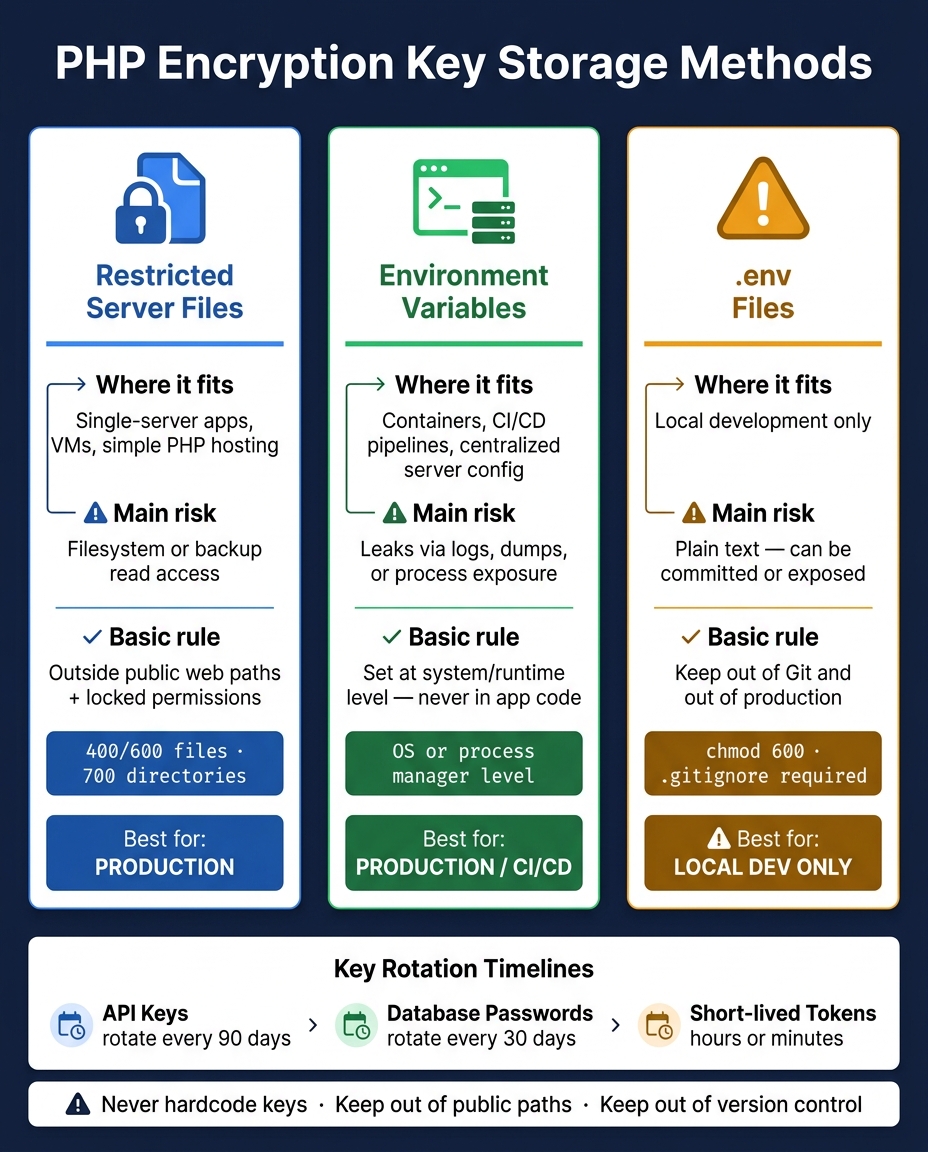
PHP Encryption Key Storage Methods: Comparison Guide
| Method | Where it fits | Main risk | Basic rule |
|---|---|---|---|
| Restricted server files | Single-server apps, VMs, simple PHP hosting | Anyone who can read the filesystem or backups may read the key | Keep files outside public web paths and lock permissions |
| Environment variables | Containers, CI/CD-based deploys, centralized server config | Keys may leak through logs, dumps, or process exposure | Set values at the system or runtime level, not in app code |
.env files |
Local development only | Plain-text file can be committed or exposed | Keep .env out of Git and out of production |
What I like about this piece is that it keeps the message simple: storage alone is not enough. Access control, rotation, revocation, and clean destruction matter just as much as where the key lives.
Core Rules for Storing Encryption Keys Safely
Once keys are out of code, the next job is to control who can read them and how long they stay valid. That applies whether you keep keys in locked-down files, environment variables, or a secrets manager.
Access Control, Separation, and Exposure Limits
Start with least privilege. Each PHP-FPM worker, CLI worker, and deployment account should have access only to the keys it needs. File system permissions should match that scope.
Separation of duties matters just as much. One person or role should not control a key from start to finish. For example, one role can handle generation and approval, while another handles deployment and monitoring. Every access event should be logged and open to review.
Use different keys for development, staging, and production. That line matters because non-production systems often leak more through logs, debugging, and test workflows.
In production, turn off detailed PHP errors, keep stack traces on the server side, and never print config values or logs that may contain keys.
Put simply: storage is only safe when key access stays tightly locked down.
Key Lifecycle: Generation, Rotation, Revocation, and Destruction
A key has a lifecycle, and that lifecycle needs active management. NIST SP 800-57 describes states such as active, compromised, retired, and destroyed.
Key generation should always use a cryptographically secure random source like OpenSSL or Sodium, not a homegrown generator. You also need a clear record for each key: who owns it, what it protects, where it is stored, and how long it is valid. OWASP advises treating secrets as short-lived, with set maximum lifetimes and automated rotation planned from day one. For example, OWASP-aligned guidance suggests API keys around 90 days, database passwords around 30 days, and short-lived tokens measured in hours or minutes.
Rotation should be automated whenever possible. And if there is suspected compromise, odd access in logs, a staff change involving key access, or an infrastructure move, rotate at once. Rotation plans also need testing. That includes failure cases, like a new key not reaching every system that needs it. With file-based storage, that means replacing the key file and resetting permissions. With environment-based storage, that means redeploying updated variables.
Revocation is the step that shuts off a compromised key. In a PHP app, that means removing the bad key from environment variables or config, deploying a replacement, and scanning repositories, CI/CD settings, and container images for leftover references.
When a key is retired, remove its material from servers, backups, and pipelines. Delete or overwrite key files, remove environment variable entries, and check that no process keeps keys in memory longer than needed. OWASP also warns against putting secrets into container images, so secure destruction includes rebuilding those artifacts without embedded keys. Log the destruction event with the date, method, and verification steps.
These rules shape how PHP should store keys in files or environment variables.
Store Keys in Restricted Server Files
File-based key storage is a solid default for PHP apps. Keep keys outside the document root, lock down file access, and keep them out of Git. For a one-server setup, that’s often the simplest path.
File Locations, Formats, and Permissions
Put key files outside the web-accessible path - not in /var/www/html, /public, or any folder your server can serve directly. A path like /etc/myapp/keys is a good fit.
For example, you might store:
- An AES encryption key in
/etc/myapp/keys/encryption.key - A separate signing key in
/etc/myapp/keys/signing.key
Then load them in PHP with file_get_contents() during bootstrap. The file format depends on the library you use: raw binary, base64, INI, or PEM can all work.
Just putting the files in the right folder isn’t enough. Permissions need to shut out other local users. Set key files to 400 or 600, set directories to 700, and make sure the PHP process user owns them. Do not make them world-readable. A safe baseline is 600 for files and 700 for directories.
chown www-data:www-data /etc/myapp/keys/encryption.key
chmod 400 /etc/myapp/keys/encryption.key
Keep the key file read-only. If you plan to rotate keys, use a separate write path for that job.
Store encryption keys and signing keys in different files. If one gets exposed, the other doesn’t go down with it. It also makes rotation and damage control much cleaner.
Add every key file path to .gitignore. You can commit a template such as encryption.key.example with placeholder values so the team knows the expected format. But the live files should never touch version control. If a secret does end up in Git history, scrub the history and rotate the exposed key.
Benefits, Risks, and When File Storage Fits Best
File storage makes the most sense for single-server setups or tightly managed VM deployments. The tradeoff is simple: if an attacker can read the filesystem or its backups, they may be able to read the keys too.
Protect the PHP Code That Loads Keys
The loader code matters as well. If someone can inspect that code, they can learn where the key is stored and how your app pulls it in.
SourceGuardian can encode and obfuscate the PHP scripts that load keys, making that logic significantly harder to reverse-engineer. It can lock scripts to a domain, IP, or hardware.
That said, there’s an important line here: it protects the loader, not the key itself. The encryption keys should still live in restricted files outside the document root and be loaded at runtime. Script protection and file-based key storage do different jobs, and they work well together - one shields the loading logic, the other keeps the secret in a locked-down place.
Use Environment Variables and .env Files Correctly
Environment variables help keep keys out of source code. Set them at the server, process manager, container, or deployment pipeline level, not inside application files. This works well when file-based storage is clunky or when deployment config already lives in one central place.
How to Read Keys from Environment Variables in PHP
Read the key with getenv() or $_ENV, then stick to that choice across the codebase. If the key is missing, fail at once. Don't use a backup value, and don't drop in a placeholder.
$encryptionKey = getenv('APP_ENCRYPTION_KEY');
if ($encryptionKey === false || $encryptionKey === '') {
    throw new RuntimeException('Encryption key is not set in the environment');
}
For production, put keys in infrastructure config, not in a .env file shipped with the app. Those values should be managed by operations through the deployment pipeline. Also, be careful with debugging output. phpinfo(), noisy exception pages, or anything that dumps $_SERVER or environment arrays in production can leak keys in plain sight.
Use .env Files for Local Development Only
A .env file is fine on a developer laptop. It's handy, simple, and easy to work with. But it's not a production secret store.
Keep .env local:
- Add it to
.gitignore - Set permissions with
chmod 600 - Commit only
.env.example
That lines up with the main rule in this article: keys must stay out of source code and out of public paths.
OWASP notes that environment variables are generally accessible to all processes on a system and may appear in logs or dumps, which is why they are not recommended as a primary secret store unless other methods are not possible.
Environment Variables vs. File-Based Storage: A Direct Comparison
| Storage Method | Strengths | Risks | Best Use | Rotation |
|---|---|---|---|---|
| Environment variables via OS or process manager | Keeps secrets out of source code; fits well with deployments | Can show up to processes or logs if setup is wrong | Production config, CI/CD injection, container runtime | Moderate - update config and restart |
.env in development |
Simple local setup; easy onboarding | Plain text on disk; can be committed or exposed by debug tools | Local development, demo machines, throwaway test environments | Low - not relevant for production |
Next, apply the same storage rules to OpenSSL and Sodium, then harden how the keys are used.
Apply the Right Storage Method to OpenSSL and Sodium, Then Harden Operations
Once you've stored the key, the next job is simple in theory but easy to mess up in practice: match the key format and loading method to the crypto library you're using.
OpenSSL and Sodium Key Handling in PHP Applications
OpenSSL and Sodium follow the same basic storage rules, but they don't use the same key format or loading flow.
For symmetric keys, store Base64 text in a file and decode it at runtime:
$key = base64_decode(trim(file_get_contents('/etc/myapp/keys/app_aes.key')));
If you're using Sodium, runtime environment injection can work too:
$key = base64_decode(getenv('SODIUM_SECRET_KEY') ?: '');
This split matters. Symmetric keys are small and plain. OpenSSL private keys are structured PEM data, so they need a different loading path.
Store OpenSSL private keys as PEM files and load them with openssl_pkey_get_private(). Never log private key material. If you're using Sodium, call sodium_memzero() after use.
Keep keys separated by purpose and by environment. A key for database field encryption should never also be used for API token signing. Production keys should never end up on developer laptops or staging systems. It also helps to store the key version next to the ciphertext so decryption can pick the right key, such as customer_data.v3. During rotation, write new records with the latest version and re-encrypt older data in batches.
When External Key Management Services Make Sense
At some point, local storage stops being enough. When that happens, key handling should move to a dedicated service.
If your app handles regulated data like HIPAA-covered health records or PCI DSS-scoped payment data, or if several services need to share the same master keys, a cloud-based KMS or HSM-backed service is the stronger option. The usual pattern is envelope encryption: the app encrypts data locally, stores the data key in encrypted form under KMS, and leaves the master key inside the service. That gives you centralized audit trails, automated rotation, and stronger isolation than local storage.
For smaller teams without compliance pressure, locked-down file storage or environment-variable storage is still a solid place to start.
Conclusion: The Safest Defaults for PHP Teams
The baseline rules are clear: never hardcode keys, keep them out of public web paths and version control, and make sure failures don't leak secret material. After that, pick the storage model that fits your setup. Files work well for classic VPS deployments. Environment injection fits containers and CI/CD pipelines.
Storage is only half the story. Day-to-day operations matter just as much. In production, set display_errors = Off, remove key paths and environment variable names from exception output, encrypt backups that include key files, and keep server access limited to the smallest group possible. Logs and error pages are common places where secrets slip out, even when storage itself looks locked down.
If you use SourceGuardian to protect your PHP code, it can also make the key-loading and key-usage logic harder to reverse engineer.
"Locking of an entire PHP project, so that no protected script can run if any other script is substituted with an unencoded one... is ideal for protecting settings, passwords etc within a PHP project." - SourceGuardian
Still, SourceGuardian is a code-protection layer, not a key store. The next step is choosing the storage method that lines up with your deployment model.
FAQs
What should I do if an encryption key is exposed?
Immediately rotate the key and re-encrypt all data with the new version. That way, old access paths stop working as soon as possible.
Regular key rotation matters. So do backups stored in secure, encrypted storage. Both help keep your application safe when something goes wrong.
Also, don't hardcode keys in scripts. Put them in environment variables or use a professional secrets management system instead.
SourceGuardian can help protect your PHP application by encoding and obfuscating scripts.
How can I rotate keys without breaking decryption?
Re-encrypt existing data with the new key. While that change is in progress, your application should support more than one key so it can still decrypt older data that was encrypted with the previous key.
In practice, that usually means storing a version ID alongside the encrypted data. That way, the application knows which key to use for decryption. Once all data has been re-encrypted, you can retire the old key.
When should a PHP app use a KMS instead of local storage?
Use a KMS instead of local storage when you need stronger security from centralized, managed, and rotated key infrastructure.
For production environments, it’s a best practice because it helps keep keys secure, backed up, and rotated on a regular schedule. Compared with local files or environment variables, a KMS cuts the risk that comes with manual file handling and server-side exposure.