

Dynamic IP Restrictions for Licensing Control
A fixed IP lock can block paying customers after a normal server move. That’s the core issue. If I want licensing control that still works in cloud, VPS, proxy, and CI/CD setups, I need runtime checks, license-file updates, and tight IP rules that match how the app is deployed.
Here’s the short version:
- Static IP locks fail when infrastructure changes
- Runtime IP checks cut down copied-license misuse
- CIDR ranges fit cloud hosting better than one fixed IP
- License files are easier to update than re-encoding scripts
- IP locks work better with domain, hardware, trial, and expiry rules
- Support workflows matter just as much as the lock itself
- Proxy, load balancer, and container setups need extra care
- CI/CD should handle encoded builds and license files as separate steps
A few facts stand out:
- Cloud and failover setups can change public IPs with no code change at all
- A one-time install check only proves where the script ran once
- In multi-stage delivery, one encoded build can serve many customers if each customer gets a separate license file
- Trial access can be limited by IP + time window, such as 14 or 30 days
If I had to reduce the whole piece to one line, it would be this: use the smallest IP rule that fits the hosting setup, then handle change through license files, not manual patching.
| Model | Best fit | Main risk | Best fix |
|---|---|---|---|
| Single IP | Stable dedicated server | Lockout after IP change | Reissue license file |
| CIDR range | Cloud, failover, managed hosting | Range too broad | Keep subnet tight |
| Layered locks | High-value PHP apps | More setup work | Use only where risk is high |
So before I ship a protected PHP build, I’d check three things first: what changes in the customer’s hosting, what lock type fits that setup, and how support will handle IP changes the same day.
Why fixed licensing rules fail and how abuse happens
Static IP locks break for a simple reason: server IPs change more often than licenses do. And when that happens, you get the worst of both worlds. Valid customers can get locked out, while copied licenses may still run somewhere else.
How static IP checks cause operational breakage
When a license is tied to one fixed IP, even a normal infrastructure change can knock out a working setup. Anything that touches the network layer can do it quietly. VM rebuilds, region restores, host changes, autoscaling, and failover events are routine. But a hard-coded IP rule treats all of them like a violation.
That’s the problem in plain English: the license is still valid, but the IP rule is no longer right.
A protected script should not stop working just because the server’s public IP changed.
And that same rigidity creates another issue. The rule is strict in the wrong place. It blocks valid deployments, yet it doesn’t do much to stop misuse after the files have been copied.
How copied licenses enable unauthorized script use
PHP applications ship as files. Files can be copied. That’s the hard truth.
If there’s no runtime validation of the live IP, domain, or hardware ID, one licensed copy can be cloned to other servers and used without permission. A one-time check during setup only records the environment at that moment. It does not confirm where the script is running now.
That gap is where abuse slips in.
Runtime validation changes the game. By checking the live IP, domain, or hardware identity each time the script runs, it becomes much harder to share a license quietly or clone a deployment without being noticed. Static rules do the opposite: once the protected files leave the original server, they leave a big window open for misuse.
Dynamic IP control closes that gap by validating the live environment at runtime.
The next step is to check the live IP, not just the installation record.
sbb-itb-f54f501
How dynamic IP restrictions work in practice
This means the license check has to happen at runtime, not during installation. When the script starts, it checks the server’s current IP against the license before it runs the app’s main code.
Runtime validation against allowed IPs or ranges
Run the check before any application code loads, then compare the current server IP with the approved IPs or CIDR ranges listed in the license’s IP rules. If there’s a match, the script keeps going. If not, execution stops or drops into a restricted mode.
SourceGuardian can bind the decryption key to the server IP, which stops the script from running on an unapproved address. But that only holds up if the license can be updated when the infrastructure changes.
Dynamic updates for legitimate infrastructure changes
When a server gets a new IP, issue a new license file with the updated IP or range. The change applies on the next restart. It’s better to use separate license files instead of hardcoded IP rules, because that lets you control updates through vendor-issued license changes without re-encoding the script. In cloud setups, where IP drift is common, SourceGuardian PRO adds dynamic licensing support for automated provisioning workflows.
It also helps to allow a short overlap between the old and new IPs during migration, then expire the old entry. And to stop people from gaming the system, limit how often a license can be reassigned during these handoffs.
Where IP locking fits with domain and hardware locks
Use the lightest lock that still stops the kind of abuse you’re trying to prevent.
- IP lock - checks the server’s network address or range; best for fixed servers, internal networks, and cloud subnets
- Domain lock - checks the hostname or domain the script runs under; best for public web apps and multi-tenant platforms
- Hardware lock - checks machine-level identifiers like MAC address or machine ID; best for on-premise deployments and private clouds
In a production deployment with more abuse risk, combining all three can make sense. That way, an attacker has to meet every condition at the same time.
With the lock model selected, the next step is production handling.
Choosing the right IP restriction model
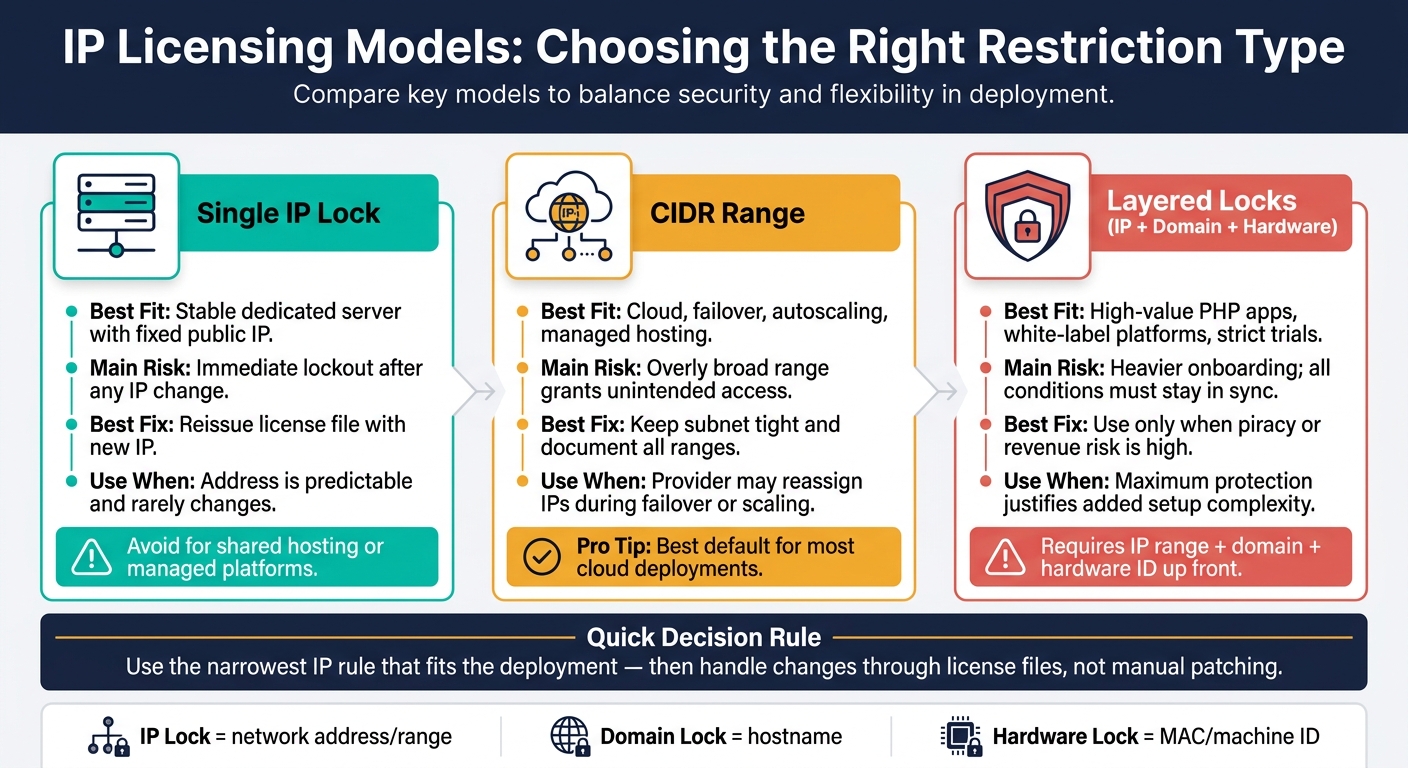
IP Licensing Models Compared: Single IP vs CIDR vs Layered Locks
Pick the narrowest IP rule that fits the deployment setup and the way updates happen. The aim isn't to lock things down as much as possible. It's to use the smallest rule that still lets customers update without a mess.
Single IP locks for stable deployments
A single fixed IP lock makes sense when the server setup is predictable, like a dedicated server with one public IP that almost never changes. Use this only when the address is stable.
If the hosting setup can swap IPs without notice, this model can turn into a headache fast. Shared hosting and managed platforms are common examples. Once the IP changes, the license stops working right away.
CIDR ranges for cloud and managed hosting
For cloud setups and managed hosting, IP range rules are often a better fit. A license can cover a CIDR block that accounts for the IPs a provider may assign during failover or autoscaling.
SourceGuardian lets you lock scripts to multiple IP or subnet entries, so one encoded PHP project can run across several IPs or subnets.
Keep those ranges tight, and write them down clearly. Every IP inside an allowed CIDR range can access the protected script. So if the range is too broad, you're giving access to more of the environment than you may want.
Layered checks for higher-risk licensing scenarios
When the software has a big revenue stake or a high piracy risk, it makes sense to combine IP restrictions with domain and hardware checks. That extra layer makes unauthorized use much harder.
This setup fits high-value PHP apps, white-label platforms spread across client environments, and trial builds where strict access control matters. The downside is simple: onboarding gets heavier. Customers need to provide IP ranges, domain names, and hardware identifiers up front. And if any one of those changes, the license has to be updated in step.
For most vendors, CIDR rules are the best default. Single IP locks fit stable servers. Layered checks make sense when the risk is high enough to justify the added work. After that, the next job is handling activation, updates, and exceptions without getting in the way of valid customers.
Implementing IP-based licensing control with SourceGuardian

Once you’ve picked the lock model, the next step is to set it up in the encoder and handle IP changes through license files. With SourceGuardian, you can enforce IP rules at encode time, then update those rules later through the license file instead of touching the protected script again.
Binding protected PHP scripts to approved IP conditions
Set the allowed IP address or IP/mask in the encoder, and SourceGuardian can tie that IP to the decryption key. If a check fails, the script exits cleanly and logs the error so support teams have something to work with.
For higher-risk deployments, you can combine IP, domain, and Machine ID checks in a single license profile.
That approach is a good fit when you want to change the rule later without re-encoding the script.
Using dynamic licensing for activation and validation
Keep the rules in an external license file so a server move only needs a new file. License files can live on a local path or be served from a remote URL, which makes central activation flows easier to run. SourceGuardian’s built-in license generator, available in both GUI and CLI modes, lets you place IP addresses, domain names, hardware identifiers, and expiry dates into each file.
SourceGuardian PRO adds dynamic licensing for CI/CD and cloud workflows.
That same license-file setup also works for temporary access and staged rollouts.
Adding trial and expiry rules for temporary access
You can set an expiration date or time limit in the license file to control trial access tied to approved IPs. For example, a trial license might allow one IP address or a tight CIDR block for 14 or 30 days. That gives a buyer time to test the software without opening up full production use.
Use online time checks to stop local clock changes from extending access. Also, issue separate licenses for development, staging, and production, each with its own IP rules and expiration date. That keeps each environment clearly bounded and auditable.
Running IP-based licensing safely in production
Dynamic IP control only works if you can approve valid changes fast and get customers back online without a mess.
Handling server migration, IP drift, and exception workflows
When a valid deployment changes IP, your license process needs to move fast too. Don’t wait until there’s a problem. Set the process ahead of time: decide who can approve a license update, what the customer needs to send, and how fast support should reply.
At a minimum, ask for:
- Old IP
- New IP
- Migration timestamp
- Ownership verification
For critical accounts, set a same-day review target.
Failed validation attempts should be logged in a way that helps support do its job. That means recording the attempted IP, license ID, timestamp, hostname when available, and the rejection reason. Just as important, keep migration-related failures separate from repeated abuse attempts. That split shapes the next step: reissue the license, apply a temporary override, or send the case for abuse review.
This recovery policy needs a clear support path. It shouldn’t depend on ad hoc calls made in the heat of the moment.
Setting clear rules for support and recovery
Define the recovery path before a lockout happens. A solid recovery policy should include a priority route for license failures, a temporary access option for confirmed customers, and a short list of what they need to provide so support can move faster.
Keep license recovery inside one documented workflow to cut delays. When you pair that with the CLI license generator, support teams can reissue a corrected license file fast, without re-encoding the protected script.
Production failures aren’t always abuse. Sometimes the network setup is the problem, and proxy layers can hide the real client IP.
Avoiding false positives in shared and proxied environments
In shared or proxied setups, the IP seen by the license check may not be the customer’s actual machine. Load balancers and reverse proxies can log their own address instead of the original request unless X-Forwarded-For or a client-IP preservation setting is in place. When that happens, a valid customer can get blocked for no clear reason. That should not be treated as proof of misuse.
In proxied or containerized environments, validate the originating client IP instead of the proxy address. If IPs tend to shift, use layered locks or CIDR-based rules. SourceGuardian also supports locking to multiple IPs at the same time, which is useful during cutovers when both the old and new addresses need to stay valid for a short period.
In Kubernetes or multi-tenant cloud setups, it often makes more sense to align license conditions with approved egress CIDR ranges rather than single node IPs. A node address can change in a blink. The egress range is usually the steadier anchor.
Compatibility planning across PHP versions and deployment workflows
After recovery workflows, the next licensing gate is deployment compatibility. IP-based licensing only works if the protection layer runs on the servers your customers use. So this needs attention before you ship a protected build, not after the first support ticket lands.
Supporting multiple PHP versions and operating systems
A license only works when the protected loader runs on the target server. SourceGuardian supports PHP 4.x through PHP 8.4, but the loader a customer needs depends on the exact PHP version, operating system, and CPU architecture in use. Loaders are released for each OS, each architecture, and each thread safety mode, including Linux x86_64 and armhf/armv7 for ARM-based servers. So even if you ship one encoded build, that server still needs the right loader.
Start with the PHP versions your customers use now, not the ones you wish they used.
Build and keep a compatibility matrix. At a minimum, track:
- PHP major and minor version
- OS family
- CPU architecture
- Thread safety mode
- Web server stack
Check the loader with phpinfo() before production. It’s a small step, but it can save hours of back-and-forth later. That check also feeds straight into the release workflow in the next stage. When the proper loader is installed, supported encoded builds run across supported operating systems.
Fitting license controls into CI/CD pipelines
Once loader compatibility is confirmed, move the license file through the same release pipeline as the build. Treat encoding, license generation, and deployment as separate stages. Test unencoded source first. Then encode it with SourceGuardian’s CLI encoder. After that, generate environment-specific license files during release and inject them through secure variables or a secrets manager. Never commit those files to source control.
SourceGuardian lets you change license conditions, including allowed IPs, without re-encoding protected files. That matters when a customer changes infrastructure or moves servers. In that case, you only need to regenerate the license file, not rebuild the whole encoded artifact. If your team ships many times a day, this keeps the process clean and avoids extra release noise.
Store license files as versioned release artifacts next to the encoded build in your artifact repository. That way, a rollback restores the matching license too, not just the code. Pipelines should also check that the license file tied to a deployment matches the target environment’s expected IP, domain, or hardware attributes before release starts. If that check fails, the pipeline should stop and log the issue clearly. Don’t let it push a broken setup and hope for the best.
In multi-tenant setups, use one encoded build and create one license file per customer at deploy time. Each file can hold that customer’s approved IP conditions, expiry rules, and any domain or hardware locks. That keeps per-environment license generation separate without forcing you to maintain different encoded artifacts.
Conclusion: Key takeaways for stronger licensing control
Static IP rules only hold up when server IPs stay the same. In cloud setups, that often isn’t the case. Providers reassign addresses, auto-scaling groups launch new instances, and routine migrations can happen with no warning. So a license tied to one fixed IP can fail under normal operating conditions, not because someone is misusing it, but because the infrastructure changed. That kind of fragility leads to extra support tickets and pushes customers toward workarounds.
Dynamic IP restrictions are a better fit when infrastructure moves around. CIDR ranges make sense for cloud and managed hosting. Runtime validation helps enforce the license against unauthorized copies. And if the hosting setup does change for a valid reason, an external license file update can deal with it without re-encoding the script.
The right rule comes down to how stable the deployment is. Use IP locks for location, domain locks for hostname, and hardware locks for machine identity. Combine them only when the product has a higher risk profile.
SourceGuardian supports IP, domain, hardware, trial, and expiry controls in the same licensing model. Its encoder can also use the IP address or domain as part of the encryption key, so protected scripts run only in the licensed environment.
This model only works if updates are handled fast and the process is clearly documented.
What to prioritize first
Start with an audit of where your current licensing breaks. Look at failed activations and check for patterns tied to migration, IP reassignment, and scaling.
Then map each deployment to the right lock type:
- single IP
- CIDR
- layered locks
After that, define a clear update workflow. It should explain how customers request changes, what verification you require, and how fast updates are handled. Without that written down, even a well-built licensing setup creates friction for paying customers.
FAQs
When should I use a single IP lock instead of a CIDR range?
Use a single IP lock for specific internal machines, fixed-egress servers, or client-dedicated hardware in stable, tightly controlled environments. It gives clear, exact access control.
Use CIDR ranges for enterprise networks or setups with multiple users, dynamic routing, or broader network segments. Since IP locking can fail if the network path changes, single IP locks work best in fixed environments.
How do license file updates work after a server IP change?
When a server IP address changes, you do not need to re-encode your scripts.
SourceGuardian keeps environment limits in external license files. That means you can generate a new license file for the new server setup and deploy it without touching the encoded code itself.
You can do this in SourceGuardian’s graphical interface or with command-line tools. If your team uses CI/CD, you can automate the process so IP limits stay in sync with server changes.
What setup works best for proxies, containers, or load balancers?
Match the locking method to how stable the environment is. In container setups, IP addresses often shift, so domain-based locking or short-lived license tokens from a central server usually work best.
If you run behind proxies or load balancers, make sure your app reads the right forwarded IP headers, such as X-Forwarded-For. Only trust those headers when they come from managed internal sources. It’s smart to audit those request paths in staging so you don’t get locked out at deployment time.