

Why Use Watermarks for PHP Code Protection?
If your PHP code leaks, protection alone may not be enough - you also need a way to tie that copy back to a customer, build, or license.
I’d sum it up like this: watermarks help me prove origin, trace leaks, and make code misuse harder to deny. Obfuscation, encryption, and server locks can slow copying, but they do not settle who the code came from. A watermark gives me a hidden marker I can check later.
Here’s the short version:
- PHP code is easy to copy once it runs on someone else’s server.
- Similarity is weak proof because many apps use the same frameworks and coding patterns.
- Static watermarks sit in code or output and can be checked without running the app.
- Dynamic watermarks appear at runtime and can link a live system to a licensed build.
- SourceGuardian plus watermarks gives me both code protection and a trail I can trace after a leak.
- The best setup starts in CI/CD, where I insert, record, encode, and verify each watermark the same way every time.
A hidden ID tied to a customer, build date, or license can turn a vague claim into something I can test and document. That matters most months later, when a copied build shows up and I need more than “this looks like my code.â€
The article also makes one point clear: a watermark works best as part of a layered plan, not by itself. I’d pair it with encoded PHP bytecode, encryption, obfuscation, execution locks, and a registry that maps each watermark to the right customer and release.
The core problem: PHP code theft and weak proof of ownership
PHP code usually gets copied through everyday access, not dramatic hacks. A contractor still has old repository access. A client installs your script on extra servers. A reseller removes your branding and sells the product as if it were theirs. The code slips out of your hands through normal business use, and once that happens, the trail often disappears.
The hard part isn't just the copying. It's proving where the code came from after it's been passed around. Once code leaves your control, legal ownership gets much harder to enforce without evidence that ties the disputed code back to its source.
Common ways PHP code is copied or reused without permission
Picture a freelance developer who delivers a PHP application to a client. Later, that client quietly installs it on more servers, and the connection to the original author is gone. Or a licensed plugin gets redistributed. Or a contractor copies core logic from a private repository right before the contract ends. Different setup, same result: no clear record of origin.
White-label resale is another common move. A third party removes attribution and resells the same application, often after it has already been deployed on a customer's server. Even if the code is hidden, renamed, or repackaged, the ownership issue doesn't go away.
Why obfuscation alone does not settle an ownership dispute
Obfuscation can slow people down, but it can't prove authorship. In a dispute, investigators still need a durable marker that connects the code to its source. If licensing logic gets tampered with or removed, the owner is stuck arguing that the code looks similar instead of showing where it came from. That's the gap: code needs a marker that can survive delivery, modification, and a legal fight.
sbb-itb-f54f501
How digital watermarks protect PHP intellectual property
Watermarks solve a simple problem: they help prove where PHP code came from after someone copies or leaks it. Unlike obfuscation or encryption, watermarking is about authorship and traceability. That’s why it works best as one layer in a broader PHP protection setup.
It does three jobs:
- It gives you proof of origin - a concrete, repeatable marker you can use in a dispute.
- It acts as a deterrent because anyone thinking about misuse knows the code may include a traceable ID.
- It increases the cost of removal. If the watermark is tied to actual application logic, taking it out can break the software.
The main difference between watermark types comes down to when you can recover the identifier.
Static and dynamic watermarks in PHP applications
Watermarks are either static or dynamic.
A static watermark is placed directly in the code or in generated output, so it can be found without running the application. In PHP, that might mean hiding a one-of-a-kind ID inside constants, arrays, or code structure. Because it does not rely on execution, someone can inspect it offline and match it to a build or license record. The downside is simple: static watermarks are easier to strip out, so they need to appear in more than one place.
A dynamic watermark shows up only at runtime. It may appear as a signed identifier or a log marker linked to a given build. That ties the watermark not only to the code itself but also to how the application behaves when it runs. This matters when the dispute involves a live system, not just a code sample. It is also harder to find and remove through static analysis alone.
What makes a watermark useful in a real dispute
A useful watermark needs to be stealthy, resilient, extractable, and hard to remove. A plain text comment is easy to spot and delete. A watermark spread across several data structures, tied to business logic, and encoded into bytecode has a much better chance of staying in place.
Cryptographic binding can make the evidence stronger. If a watermark token comes from known inputs like a license ID and build timestamp, an independent expert can recompute it and check it against the disputed code. That makes the process objective and repeatable, which matters in a dispute. It also helps to keep an internal record that maps each watermark ID to a customer, build number, and license term, so you can still verify it months or even years after deployment.
The target is simple: a watermark that is hard to remove without damaging the code. When watermark logic lives inside the core application flow, removal becomes a functional risk, not just a cleanup job. In practice, the strongest watermarks are built during packaging and deployment, not bolted on after release.
Using watermarks with SourceGuardian for layered PHP protection
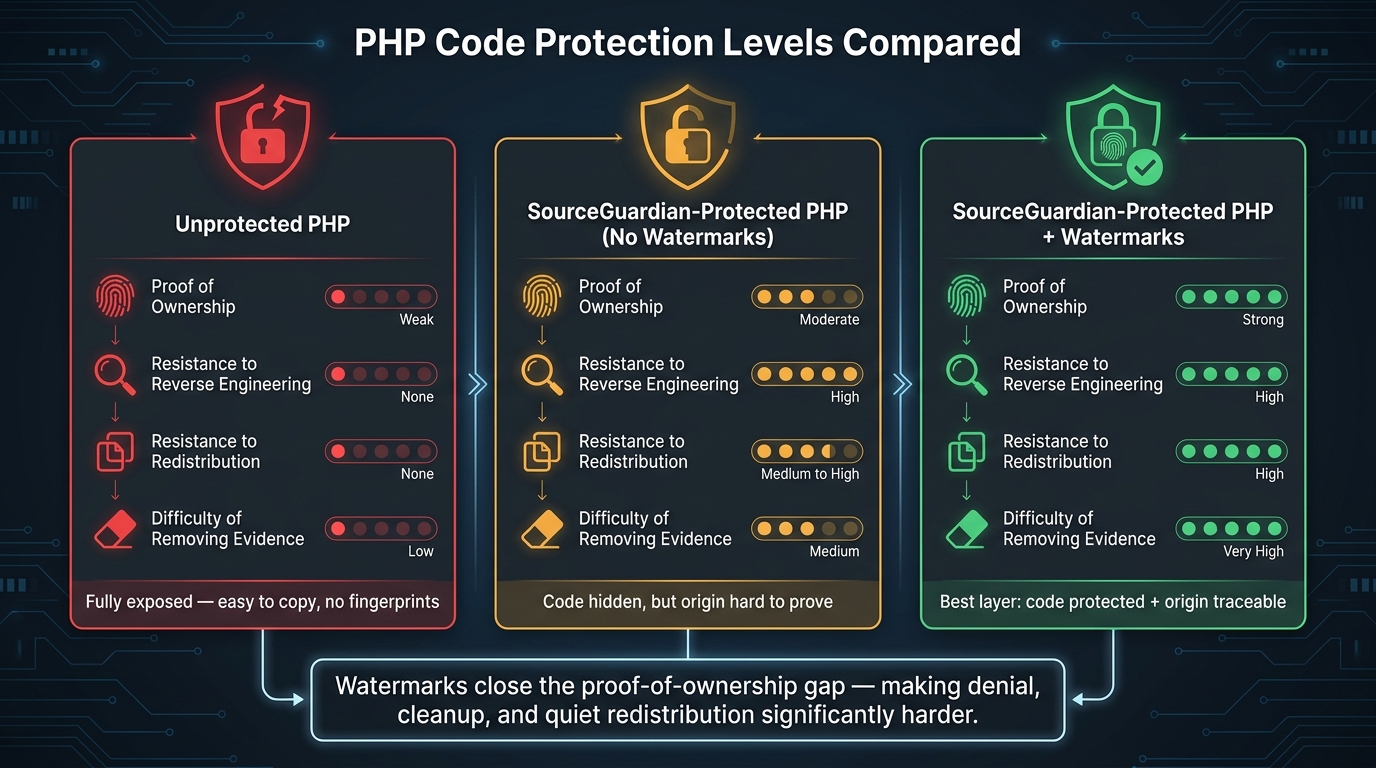
PHP Code Protection: Unprotected vs. SourceGuardian vs. SourceGuardian + Watermarks
SourceGuardian protects the code. Watermarks keep proof of origin. SourceGuardian compiles PHP source into bytecode, adds encryption layers, and obfuscates symbol names and structure before deployment. Locking by IP, domain, or hardware then limits where that code can run. Watermarks add customer-specific attribution to a protected build. That split matters when a leak happens: protection helps limit access, while watermarks point to the exact build.
"SourceGuardian PHP Encoder protects your PHP scripts by compiling the PHP source code into a bytecode format, followed by encryption layers." - SourceGuardian
Where watermarking fits in the build and deployment process
Once the role of watermarking is clear, the next step is deciding where it belongs in the build flow. In practice, the best spot is before encoding. A build script can inject a one-of-a-kind identifier, such as a customer ID, license ID, or build date in MM/DD/YYYY format, into a dedicated PHP module like WatermarkIdentity.php.
That module can expose methods like getCustomerId() and getBuildId() for logging, licensing, or diagnostics. If the build leaks later, that identifier becomes the link back to the license holder. After that, SourceGuardian encodes the code, so those identifiers end up compiled into bytecode and wrapped in encryption.
SourceGuardian PRO's command-line interface makes this easy to automate in CI/CD. A build job can:
- generate the watermark module from environment variables
- run the encoder
- check the watermark in staging
- deploy the protected build
SourceGuardian also supports custom text in generated license files, which gives you a second ownership reference tied to the license.
It also helps to keep a secure internal registry that maps each watermark ID to a customer name, contract, and build date. If a leak shows up months later, that record is what turns a suspicious copy into something you can trace.
Unprotected PHP vs. SourceGuardian-protected PHP with and without watermarks
The comparison below shows why attribution matters just as much as code protection.
| State | Proof of ownership | Resistance to reverse engineering | Resistance to redistribution | Difficulty of removing evidence |
|---|---|---|---|---|
| Unprotected PHP | Weak - plain source is easy to copy with few unique markers | None - source is fully readable | None - can be copied and run anywhere | Low - identifiers can be edited or removed directly |
| SourceGuardian-protected PHP without watermarks | Moderate - license records exist, but few code-level fingerprints | High - bytecode, encryption, and obfuscation hinder analysis | Medium to high - locking by IP, domain, or hardware limits execution | Medium - no embedded ID to scrub |
| SourceGuardian-protected PHP with watermarks | Strong - unique identifiers tie the build to a customer, version, or date | High - same technical barriers apply; watermark logic is hidden inside encrypted bytecode | High - locking restricts execution; traceable watermarks deter misuse | Very high - removal risks breaking the application and requires deep tampering |
Watermarks close the proof-of-ownership gap. SourceGuardian already makes reverse engineering much harder. Watermarks make cleanup, denial, and quiet redistribution a lot harder too.
Implementation priorities and conclusion
Choosing a watermark strategy that is maintainable
A watermark only helps if you can build it, track it, and verify it the same way every time. If that process drifts, the identifier can become useless when a dispute shows up months later. And that’s usually the moment it matters most.
Start by choosing the identifier scope:
- Per-customer IDs for client-specific work
- Per-build IDs for frequent releases
- Per-product-line IDs for broader ownership claims
Stick with one main scheme. Add a second ID only if you need a more detailed dispute trail.
After that, connect the scheme to your build pipeline so each release follows the same path. Automate insertion and verification in CI/CD, and keep watermark placement limited to a small number of stable points in the PHP architecture. If you use SourceGuardian, rely on its command-line workflow to inject identifiers before encoding. Then confirm the encoded build still carries the watermark and that runtime licensing doesn’t block extraction.
Your watermark registry should live in a database, not a spreadsheet. Track the watermark ID, assignment type, package name, encoding profile, release version, CI/CD job ID, and SHA-256 checksums of key encoded files. Also, document extraction now, not later. Include the commands, expected output, and the evidence trail so engineers and legal teams can check the watermark when they need to.
Key takeaways
Once the strategy is set, the focus moves from planning to repeatable execution.
When PHP code leaves your hands, theft is hard to police. Obfuscation by itself also can’t show who redistributed a given build. Watermarks help close that gap. Static identifiers embedded in code and dynamic markers emitted at runtime can give you lasting technical evidence of origin.
That evidence gets stronger when it lines up with other records. Watermarks work best with contracts, version control history, and licensing records. Pair watermarking with SourceGuardian’s bytecode compilation, encryption, obfuscation, and execution locking by IP, domain, or hardware, and you get a stronger barrier against theft plus a cleaner forensic trail if a leak happens.
"It is absolutely crucial to fully encrypt your PHP source code, especially if it is worth a lot. On the internet, you can lose control of your work in a second." - SourceGuardian
Roll this out in phases. Start with one product. Then add dynamic watermarks and CI/CD. Then expand across the portfolio. A watermark has one job: still point to the right build months later during a dispute. That only happens when the system is built to last, not just pushed out the door.
FAQs
How do I verify a leaked PHP build using a watermark?
With SourceGuardian, verification is based on integrity locking, not a standard watermark. Instead of checking files one by one in isolation, it protects your project as a single system.
If someone drops in an unencoded file, a mismatched file, or a file encoded in a different way, the application stops working. That means only scripts authorized by your SourceGuardian installation can run, which makes leaked or tampered files useless.
Can a watermark survive code changes or tampering?
Yes. SourceGuardian uses anti-tampering measures like bytecode compilation, multi-layer encryption, and integrity locking to help protect your PHP code from unauthorized changes.
If someone swaps a protected file with an unencoded or unauthorized version, the application stops working. IP, domain, and hardware locking also help block use in unauthorized environments.
What data should I store in a watermark registry?
Store key customer details like name, email, and company, along with technical limits such as the authorized domain, IP address, or hardware ID.
You should also store trial dates, feature permissions, and the encrypted identifiers built into your code. That gives you a clear way to track deployments and spot unauthorized use.