

PHP License Servers: Revocation and Renewal Tips
If I had to boil this down to one rule, it’s this: treat expiration, suspension, and revocation as three different events and wire your PHP app to react to each one in one clear way. That alone cuts support confusion, reduces downtime, and makes audits easier to follow.
Here’s the short version:
- Expiration is date-based. It should move from
activetoexpired, then through a 7- to 30-day grace window before hard denial. - Suspension is temporary. I’d use it for billing issues, policy checks, or account holds that may be cleared later.
- Revocation is final. I’d reserve it for cases like leaked keys, seat abuse, chargebacks, or compromised accounts.
- Renewal should usually update the expiration date only, not the whole license record.
- The server should decide whether access is allowed, warned, or denied. The app should not guess.
- Audit logs matter. I’d store reason codes, UTC timestamps, actor details, domains, IPs, hardware IDs, and activation history.
- Apps should fail closed on revocation. If a full stop is too harsh, a read-only mode is often a safer fallback.
- Alerts should start early. The article points to notice windows at 90, 60, 30, 15, and 7 days, plus post-expiration follow-ups.
- SourceGuardian fits this flow by checking encoded script security against license metadata such as domain, IP, hardware ID, and time limits.
A few numbers stand out. A 10-day renewal watchlist helps support teams spot risk before service stops. And a 7- to 30-day grace period gives customers time to fix billing or renewals without instant downtime.
If you manage PHP licensing, I’d keep the model simple: one status set, one logging path, one renewal path, and one runtime check. That’s the core idea behind the article.
Revocation: when to use it and what follows
When revocation is the right call
Use revocation only when there’s a clear case of abuse or risk. The main triggers are public key leaks, overused seats, chargebacks, compromised accounts, or unauthorized resale/bundling.
This kind of enforcement is direct and targeted. You change the license status in one central place, and the affected licenses are blocked on their next check-in. Other customers on other deployments keep working as usual. Once you confirm the trigger, move straight to the status update and the audit log.
How to enforce and log revocation
Set the license to an explicit revoked status in your data model. Save a reason code such as LEAKED_KEY, CHARGEBACK, SECURITY_INCIDENT, or POLICY_VIOLATION, along with a human-readable note, an exact UTC timestamp, and the actor that triggered it. That actor might be an admin user, an automated fraud monitor, or a billing system.
Keep activation records as an immutable, searchable audit trail. That includes:
- Domain
- IP address
- Hardware ID
- Activation timestamp
Support teams use this data to explain why a customer lost access. Security teams use it to trace which endpoints were affected. Your audit logs should be searchable by license ID, customer account, domain, and hardware ID.
After a license is revoked, block all future activations tied to that license ID. If previously activated hardware sends a heartbeat or refresh request, return revoked - not expired and not invalid. The app should treat that response as final and stop protected execution.
How PHP apps should respond to a revoked license
When the server returns revoked, the app must fail closed right away. In plain English, that means stopping protected business logic and showing a clear error for the admin. Silent failures are the worst case. They leave people wondering if the issue is a network glitch, a billing problem, or something more serious.
Show an admin-facing message that states the cause and the next step. For example: update billing, review deployments, or rotate credentials.
If a hard stop would interrupt day-to-day operations, switch to read-only mode instead. Disable core functions, but keep exports or admin access available. Renewal should restore only the licenses that are supposed to return to service.
sbb-itb-f54f501
Renewal: extending access without disrupting deployments
PHP License Server: Revocation vs. Renewal Methods Compared
How expiration dates and grace periods should work
Revocation ends access. Renewal brings it back, but only after a new validation. If a license has been revoked, renewal is the route back to active service for licenses that are still valid.
A good license server keeps the expiration date separate from the block date. When a license hits its end date, move it from active to expired, then to grace, and only after that to hard denial. A 7- to 30-day grace period gives teams breathing room to renew without causing instant downtime.
Track these fields in the system:
- activation date
- expiration date
- grace-end date
- status
- last validation timestamp
Use clear status values like active, expiring soon, grace, and expired. That keeps the logic easy to follow for engineers and support staff alike. It also helps to show days remaining in the app or admin dashboard so no one gets blindsided.
Renewal methods for online and managed environments
Once grace rules are in place, the next step is deciding how renewals get approved and applied.
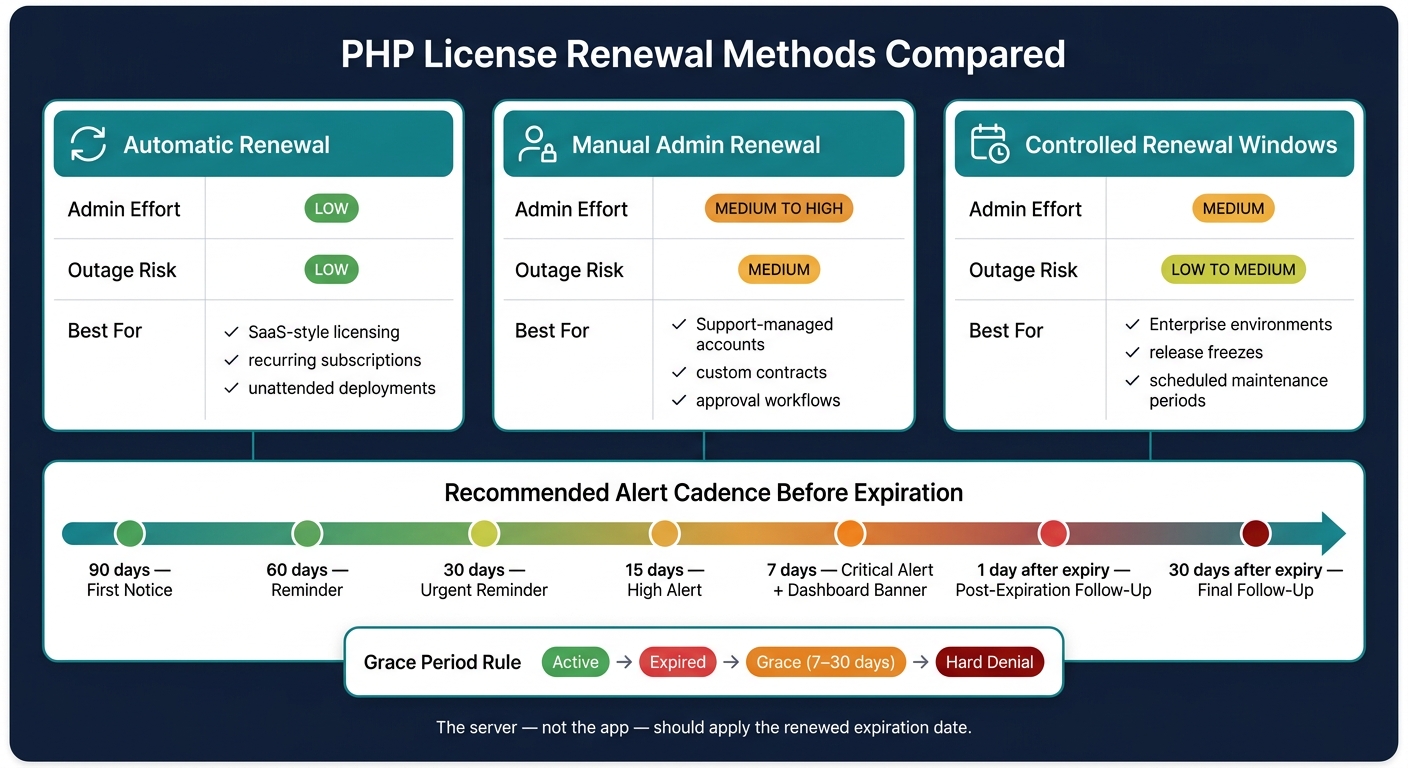
Automatic renewal is usually the best fit when payment and entitlement updates can sync on their own. Manual admin renewal works better for support-managed accounts, custom contracts, or approval-heavy setups. Controlled renewal windows are often the safest choice when deployments need to line up with change-management rules or planned maintenance.
| Renewal method | Admin effort | Outage risk | Best-fit use case |
|---|---|---|---|
| Automatic renewal | Low | Low | SaaS-style licensing, recurring subscriptions, unattended deployments |
| Manual admin renewal | Medium to high | Medium | Support-managed accounts, custom contracts, approval workflows |
| Controlled renewal windows | Medium | Low to medium | Enterprise environments, release freezes, scheduled maintenance periods |
The server - not the app - should apply the renewed expiration. In production, renewal should usually change only the expiration date.
Tracking renewals before they cause outages
A nightly scheduled job can do a lot of heavy lifting here. Have it scan all active licenses and flag anything with 10 days or fewer remaining. That report should show customer name, license ID, expiration date, days remaining, and renewal state. This way, support teams can sort by urgency instead of hunting through records one by one.
Revenera recommends a tiered alert cadence of 90, 60, 30, 15, and 7 days before expiration, with follow-up notices sent 1 day and 30 days after expiration. In the last 10 to 14 days, use dashboard banners, email reminders, and admin alerts together. One alert channel is easy to miss. A few well-timed nudges are harder to ignore.
To see whether the process is working, track a small set of metrics over time:
- percentage of licenses renewed before expiry
- average time from first alert to renewal
- number of production incidents tied to expired licenses
If outages start creeping up, that's usually a sign that alerts are going out too late or the grace window is too short.
These renewal controls feed directly into runtime validation and deployment rules.
SourceGuardian workflows for dynamic licensing
How SourceGuardian validates encoded scripts and license metadata
SourceGuardian turns license-server rules into checks that happen when the script runs. It compiles PHP into bytecode, adds encryption, and then requires the Loader to verify each script against a license file or embedded metadata before anything executes. Encoded scripts work only with the SourceGuardian Loader.
That metadata can include the owner, expiration date, domain, IP address, and hardware IDs. If any check fails, execution stops. For time-based licenses, SourceGuardian can also query an online time server to stop users from rolling back the system clock.
Using domain, IP, and hardware locks in revocation and renewal workflows
These locks give you a simple way to revoke access for one server, domain, or device without changing the encoded code. That’s the big win: one deployment can be shut off while the rest keep running.
| Restriction Type | Validation Input | Operational Tradeoff | Common Use Case |
|---|---|---|---|
| Domain Lock | Domain name / URL | Requires fixed hosting; DNS changes may break access. | SaaS platforms and web-based plugins. |
| IP Lock | Server IP address | High security; breaks if the server moves to a new IP. | Enterprise on-premise installs. |
| Hardware Lock | MAC address / Machine ID | Most restrictive; requires manual intervention to move. | High-value node-locked software. |
| Time Lock | Expiry date / days limit | Requires time sync; prevents long-term use without renewal. | Free trials and subscriptions. |
| Online Lock | Internet connection | Requires connectivity; enables instant remote revocation. | Managed services and phone-home apps. |
For locked deployments, SourceGuardian can use the domain name or IP address as part of the encryption key. So if someone copies the license file to another server, it still won’t work. The script can’t decrypt because the new environment doesn’t match.
Using dynamic licensing in CI/CD and deployment pipelines
SourceGuardian PRO supports CLI automation (see technical documentation), which makes it a good fit for CI/CD. You can encode PHP, generate the right license file, and deploy both as part of the pipeline.
A clean setup usually splits the work into three parts:
- Encode the PHP source into bytecode
- Generate the license file for the target environment
- Deploy both artifacts together
This setup has a nice upside: you encode once, then issue different license files for different users or environments as needed. No re-encoding is required when a license is renewed or when a new environment comes online. If a renewal happens, the server sends a new license file only - the encoded code stays the same.
For on-premise software with strict security needs, Machine ID or MAC address locking ties each deployment to a specific piece of hardware. If the customer moves the software to another machine, you need to re-license it.
Conclusion: key practices for reliable revocation and renewal
Once the rules are set, the main goal is simple: be consistent. Use one status model, one enforcement path, and one renewal path. Keep that same status model across licensing, support, and runtime enforcement. A structured setup with short reason codes makes every status change easy to audit and helps your team stay on the same page.
Revocation should be reserved for serious abuse. If a license just isn’t renewed on time, a short grace period can help absorb billing delays without shutting off legitimate users all at once.
After revocation is limited to serious cases, the next focus is avoiding preventable expirations. Track each license by environment, and watch expiration dates early enough to renew before service is interrupted.
At runtime, mirror the license server’s decision through one shared check. Centralize license checks so every protected request reads the same status and stops protected execution cleanly if a license is revoked.
Keep audit logs complete and searchable. Pair that with clear ownership for each lifecycle event, and your operations, billing, and support teams will have the visibility they need to act fast when something goes wrong.
FAQs
When should I revoke a license instead of suspending it?
Use suspension for temporary cases. It can be reversed, and it lets you shut off access from one place without ending the license for good.
Use revocation only for permanent cases, like confirmed license abuse, deliberate cracking attempts, or a cancellation after a chargeback. Document the process and log events at high severity so you have a clear record.
What should my PHP app do during a grace period?
During a grace period, your PHP application should keep working as usual so you don't end up with a sudden service outage. This buffer often lasts 3 to 7 days, which gives users a short window to renew or deal with server-side changes.
While that window is open, send renewal notices and prompts to update the license. At the same time, keep checking license status so access is restricted at the right moment when the grace period ends.
How can I renew a license without redeploying code?
You don’t need to re-encode or redeploy your code to renew a license. SourceGuardian keeps license terms - like expiration dates, domain restrictions, and IP limits - in a separate license file.
Just generate and issue a new license file with the graphical interface or command-line tools. Once the new file is in place, the application will pick up the updated terms on the next check.