

How Layered Encoding Secures PHP Code
Layered encoding makes PHP code harder to read and copy - not impossible to reverse engineer. I use a 4-step workflow with SourceGuardian: prepare the source, protect it, test the build, and deploy it with the correct loader.
Here’s what I check:
- Prepare: Separate private logic from editable files, keep passwords and API keys outside distributed code, and test the original app.
- Protect: Compile PHP into bytecode, apply encryption, and set license limits for permitted hosts or expiration dates.
- Test: Check web and CLI execution, loader compatibility, license behavior, response time, CPU use, and memory.
- Deploy and maintain: Release the protected files, keep source private, plan license updates, and retain a tested rollback package.
My rule: <u>code protection is not application security</u>. It adds barriers to inspection, but it does not fix SQL injection, weak access controls, or exposed secrets.
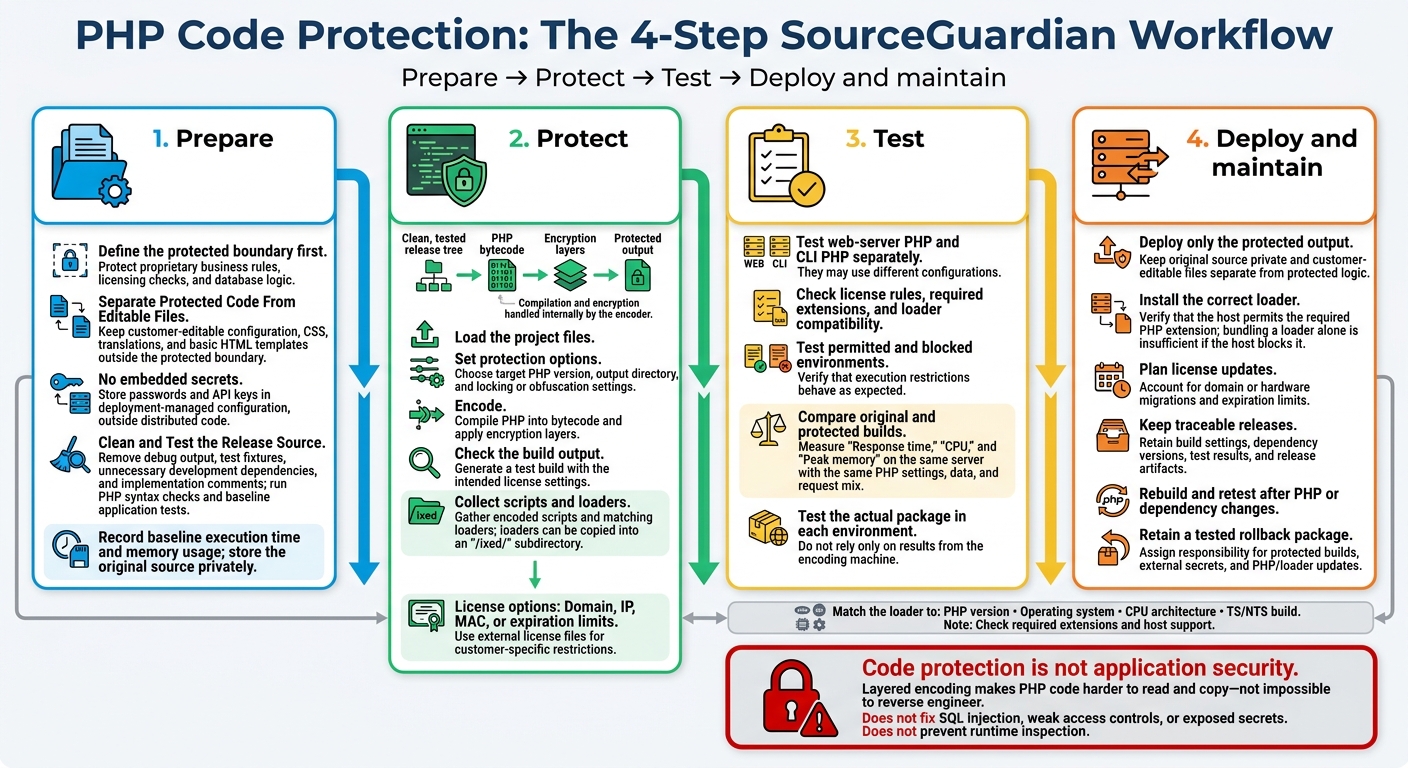
PHP Code Protection: The 4-Step SourceGuardian Workflow
Setting Up WordPress with Docker and Installing SourceGuardian | Using ChatGPT
sbb-itb-f54f501
Step 1: Prepare the PHP Project
Start by identifying the files that contain proprietary business rules, licensing checks, and database logic. Define the protected boundary first: it determines which files get encoded and which stay editable.
Separate Protected Code From Editable Files
Keep customer-editable configuration, CSS, translations, and basic HTML templates outside the protected boundary. Unencoded scripts can include protected scripts without exposing the core logic. Encode non-PHP templates only if customers don’t need to edit them.
Store credentials and API keys in deployment-managed configuration. Encoding does not protect secrets used at runtime. For IP, domain, or MAC-address locks, use external license files rather than hardcoding customer-specific restrictions. Apply project-wide locking to prevent unencoded files from being swapped into the build.
Clean and Test the Release Source
Once you’ve separated the files, create a clean release tree for encoding. Remove debug output, test fixtures, development dependencies you don’t need, and implementation comments.
Run PHP syntax checks and baseline application tests before encoding. Record execution time and memory usage for repeatable test runs, and store the original source privately.
Document the supported PHP versions, required extensions, operating systems, CPU architectures, and TS/NTS builds. Use the Loader Assistant to find the correct loader and install path. Check that each host allows the required PHP extension: including a loader file in the package won’t help if the host blocks the extension.
Step 2: Protect PHP Code With SourceGuardian
SourceGuardian compiles PHP into bytecode, adds encryption layers, and uses a compatible loader to run the protected code.
Use the tested release tree from Step 1 as your encoding input.
Set Up the Protection Pipeline
Encode only the clean, tested release tree. The encoder handles compilation and encryption internally.
- Load the project files: Create a project in the GUI or CLI, then load the release folder or selected PHP files.
- Set protection options: Choose the target PHP version, output directory, and any locking or obfuscation settings you need.
- Encode: Run the encoder to compile PHP into bytecode and apply encryption layers.
- Check the build output: Review the output, then test the protected build with its intended license settings.
- Collect scripts and loaders: Gather the encoded scripts and matching loaders. The encoder can copy the loaders into an
/ixed/subdirectory automatically.
Choose an Edition and Target Platform
Choose based on licensing and deployment needs - not the interface. Match the encoder and loader to the target PHP version, OS, CPU architecture, and TS/NTS build.
| Plan or platform | Protection and licensing features | Platform considerations |
|---|---|---|
| Standard | Bytecode compilation, encryption, script locking, and trial creation | Windows, Linux, and macOS |
| PRO | Standard protection plus dynamic licensing | Windows, Linux, and macOS |
| FreeBSD | Core protection, script locking, and trial creation | No GUI |
FreeBSD supports command-line encoding only.
Configure Licenses and Create a Test Build
Before encoding, confirm the selected files, PHP target, and loader requirements. Set domain, IP, MAC, or expiration limits, then generate a test build.
Domain or IP locks can be tied to the encryption key to block hosts that aren't permitted to run the code. For expiration checks, SourceGuardian can verify the time using atomic online time servers. Protected non-PHP files may need app-level changes so encoded scripts can read them.
Test the build in both permitted and blocked environments to check that the restrictions work as expected. Execution restrictions control where protected code runs. They don't protect exposed credentials or replace server-side access controls. Use the test build results in Step 3 to check deployment behavior before deploying.
Step 3: Test, Deploy, and Maintain the Protected Build
Test Application and License Behavior
Use the test build from Step 2 to check deployment behavior before release. Run the protected build through both web and CLI paths. Check license rules, required extensions, and loader compatibility.
Test web-server PHP and CLI PHP separately. They may use different configurations. The SourceGuardian Loader Assistant identifies the exact loader for each runtime. Follow its instructions to install the loader in the PHP extension directory or bundle it in /ixed/. Then check that both environments can run protected scripts.
If a script won't start, check that the loader matches the PHP version, operating system, architecture, and TS/NTS build. Once functionality passes, measure overhead under production-like conditions.
Measure Performance and Check Deployment Requirements
Compare the original and protected builds under the conditions they'll face in production. Measure response time, CPU, and peak memory on the same server, using the same PHP settings, data, and request mix.
Before release, check that a supported loader exists for every deployment configuration. Test the actual package in each environment - not just on the encoding machine.
Keep the Release Workflow Secure
Limit access to source, license files, and build credentials. Where appropriate, use SourceGuardian PRO’s command-line workflow to automate encoding and protected-build validation in CI/CD.
Keep build settings, dependency versions, test results, and release artifacts so you can trace each release. Rebuild and retest after PHP or dependency changes. Document license updates for domain or hardware migrations, and keep a previously tested package ready for rollback.
Review Protection Benefits and Limits
Layered protection hides source and restricts execution. But it doesn't prevent runtime inspection or remove the need for the correct loader and license updates.
Once deployment checks pass, review the remaining operating limits before packaging the release and moving to the final checklist.
| Protection mechanism or requirement | Practical benefit | Limitation or operational cost |
|---|---|---|
| Bytecode compilation | Removes directly readable PHP source from protected files | Requires a matching runtime loader |
| Encryption | Adds protection around compiled code | Code must be decrypted for execution |
| Execution locks | Limits use to authorized environments | Domain, IP, or hardware changes may require license updates |
| Runtime loaders | Enables execution of protected scripts | Must match PHP version, operating system, architecture, and TS/NTS settings |
| Protected-build maintenance | Supports traceable releases and rollback | Requires renewed testing after runtime or dependency changes |
Conclusion: Release Checklist and Security Limits
Finish the prepare-protect-test-deploy workflow by checking file selection, cleanup, protection settings, and deployment tests.
- [ ] Private source only: Store original source in a secure, private repository. Deploy only the protected output.
- [ ] Clean release tree: Confirm cleanup is complete and the intended PHP files are protected.
- [ ] Editable config outside the build: Keep user-editable configuration separate from protected logic.
- [ ] No embedded secrets: Store passwords and API keys externally.
- [ ] Document loader requirements: Record the required OS, CPU, PHP version, and TS/NTS settings.
- [ ] Verified access locks: Check IP, domain, hardware, and expiration locks.
- [ ] Recorded performance: Record response-time, CPU, and memory results against the release’s performance baseline.
- [ ] Assigned owners: Assign responsibility for protected builds, external secrets, and PHP/loader updates.
FAQs
How can I debug SourceGuardian-encoded PHP code?
Debugging SourceGuardian-encoded PHP code has limits and should take place outside production. Build, test, and debug plain PHP before encoding it. Encoding compiles the source code into encrypted binary bytecode.
To troubleshoot errors, define a custom error handler in your project's Custom Header section. This section stays unencoded, allowing the handler to log errors securely without exposing sensitive data.
Match your testing environment to production, including the operating system, PHP version, and thread-safety configuration.
What happens if my license server is unavailable?
Your protected scripts run according to your licensing and environment-lock settings. SourceGuardian can lock scripts to a domain, IP address, or hardware ID and check that lock at runtime.
If your setup requires an active connection to the license server, an outage stops the script from verifying its authorization. The script won’t run: the loader must complete validation before it can decrypt and execute the protected bytecode.
Can I update encoded files without re-encoding the whole project?
You can’t edit encoded files directly. Doing so makes them unusable. SourceGuardian checks integrity across the entire project to prevent file substitution, so all scripts must work together as one set.
To update your application, edit the original source code, then re-encode the project. SourceGuardian lets you encode only the files changed since your last encoding session, saving time during updates.