

5 PHP Script Packaging Methods Compared
If I had to boil this down to one point, it’s this: the more you try to hide PHP code, the more setup you add. In this comparison, I see five clear options: minified source, obfuscated source, encrypted files with a loader, custom archives, and bytecode-encoded packages. The split is simple: plain-source methods are easy to ship but easy to inspect, while loader-based methods protect code better but add host checks and release work.
Here’s the short version I’d give anyone shipping PHP to clients, resellers, or another server:
- Minified PHP: easiest to ship, no code protection
- Obfuscated PHP: light deterrent, still plain
.php - Encrypted files + runtime decryption: more protection, but server support matters
- Custom archives / bundles: cleaner delivery for multi-file apps, not much protection by itself
- Bytecode-encoded packages: strongest code hiding in this list, but needs a matching loader
A few facts stand out fast:
- One obfuscation test in the article showed only a 1.6% QPS drop
- Bytecode and encrypted methods depend on PHP version, OS, and loader support
- Licensing controls like IP, domain, hardware locks, and trial limits are much stronger when they sit in the runtime layer instead of plain source
If I were choosing by use case, I’d frame it like this:
- Internal tools: minified, obfuscated, or archives may be enough
- Client handoff on locked-down hosting: source-level methods are easier to deploy
- Paid PHP software: bytecode encoding is the better fit if the host can run the loader
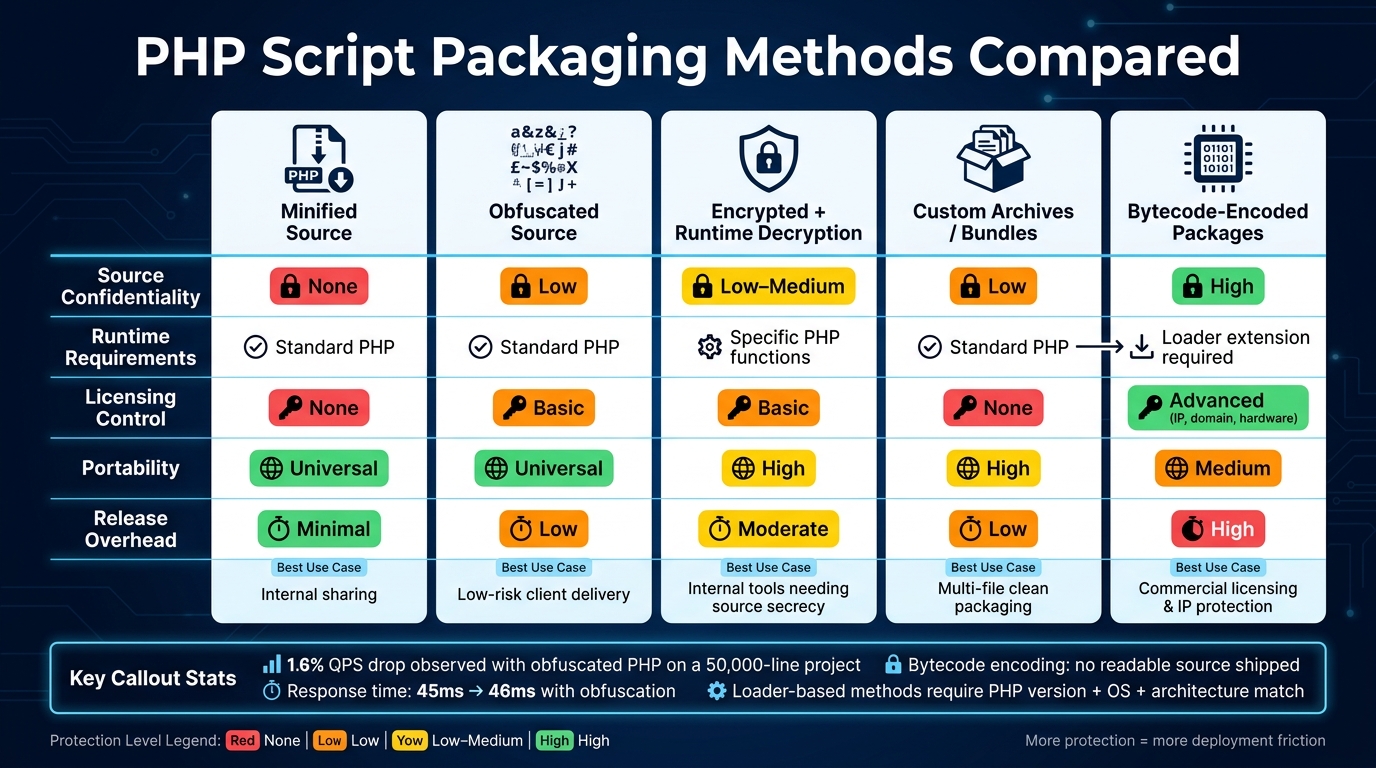
PHP Script Packaging Methods Compared: Protection vs. Portability
Scriptcase - Learn how to encrypt your PHP applications
sbb-itb-f54f501
Quick Comparison
| Method | Code Hiding | Runtime Needs | Licensing | Best Fit |
|---|---|---|---|---|
| Minified Source | None | Standard PHP | None | Simple internal sharing |
| Obfuscated Source | Low | Standard PHP | Light checks in code | Low-risk client delivery |
| Encrypted + Runtime Decryption | Medium | Loader or runtime layer | Better than source checks | Mixed protection and control |
| Custom Archives / Bundles | Low on its own | Often standard PHP | Usually none by itself | Clean multi-file packaging |
| Bytecode-Encoded Packages | High | Matching loader required | Strongest in this list | Commercial distribution |
Bottom line: if you need portability, stay with source-level packaging. If you need stronger code secrecy and license control, move to bytecode encoding and verify host support before release.
1. Minified PHP Source Files
Minification removes comments, extra whitespace, and, in some cases, shortens variable names to make a leaner PHP file. It’s the simplest packaging method you can use. It’s also the weakest.
Source confidentiality
The result is still a plain .php file. Anyone who gets it can open it in a text editor, clean up the formatting, or parse it and recover a lot of the original structure. As researchers Dario Weißer, Johannes Dahse, and Thorsten Holz from Ruhr-University Bochum put it:
"PHP applications are usually shipped as plain source code which is easily understood or copied by an adversary."
That’s the core issue. Minification may slow down a casual reader for a moment, but it doesn’t add much real resistance against reverse engineering.
Runtime and deployment
On the plus side, runtime and deployment are frictionless. Minified files run on standard PHP installs and can be deployed with a simple upload. There’s no need for loaders, extensions, or server-side changes.
Licensing control
There’s no built-in licensing enforcement here. If you add a license check in the code, someone can still find it and remove it. If licensing matters, you need a different packaging method.
Minification keeps PHP code easy to move and ship, but it does little to protect it. In practice, it works best as a basic packaging step, not as a security layer.
2. Obfuscated PHP Source
Compared with minification, obfuscation changes the code itself, not just how it looks. It doesn't stop at removing whitespace. It rewrites parts of the program by renaming variables to strings like $a1b2c3, hiding string literals, and turning normal control flow into switch-heavy logic. The end result is still a normal .php file that PHP can run, but it's much harder for a person to read.
Source confidentiality
Obfuscation makes reverse engineering harder, but it doesn't stop it. Dario Weißer, a security researcher from Ruhr-University Bochum, put it this way:
"Obfuscation provides at least some protection of the source code and hampers an adversary to a certain extent."
That line gets to the point. Obfuscation can slow someone down, but it won't lock the door. Simple eval(base64_decode()) chains are easy to undo and don't offer much commercial protection. Even stronger source-level obfuscation is still easier to crack than bytecode-encoded packages.
So where does that leave it? Right in the middle. It's stronger than minification, but weaker than encoded packaging. And because the file still runs as plain PHP, the tradeoff leans away from protection and toward portability.
Runtime requirements
Since the output remains a standard .php file, it runs in normal PHP setups without extra extensions or server-side changes. That's a big plus for shared hosting or client-managed servers where installing extra components isn't an option.
The performance hit also looks small. One 50,000-line project showed only a 1.6% drop in QPS, while response time moved from 45 ms to 46 ms. For most apps, that's the kind of change you'd barely notice.
Licensing control
Obfuscated PHP can add licensing checks for things like domain, IP, MAC address, and expiration dates by placing that logic directly into the changed source. On paper, that sounds useful.
But there's a catch: those checks ship inside the same file the customer receives. If someone de-obfuscates the code, they can strip those checks out. So this works more like a light control layer than a hard barrier for software distribution.
Deployment complexity
From a rollout standpoint, this is about as simple as it gets. Upload the files through FTP or push them through your usual CI/CD pipeline, and you're set.
The downside shows up later, when you need to debug. Obfuscated code is much harder to inspect, so it's smart to keep a clean, unobfuscated copy for development and troubleshooting.
3. Encrypted PHP Files With a Runtime Decryption Layer
This method protects PHP by compiling it into encrypted bytecode instead of leaving readable source code on disk. Open the file in a text editor, and it looks like nonsense. When the code runs, a server-side PHP extension called a Loader decrypts that bytecode in memory and hands it off to PHP at runtime.
SourceGuardian adds another layer in its PRO version with Bytecode Entangling. In plain English, it splits compiled bytecode into logic fragments and rearranges them, which makes debugger-based tracing much harder. The trade-off is simple: this setup depends on the Loader.
Source confidentiality
This gives stronger protection than plain obfuscation, but it doesn't make reverse engineering disappear. At some point, the interpreter still has to turn the protected code into instructions it can execute. So the main effect is that reverse engineering gets more expensive and time-consuming, not impossible.
Runtime requirements
Every server that runs the encrypted files needs the matching Loader extension installed. That includes your development machine, staging setup, and production server. Each one needs a Loader version that matches the target PHP version and operating system.
In many cases, the Loader must be installed manually. That's where things can get messy, especially on shared hosting where you may not have much server access.
Licensing control
Because the Loader handles licensing, compatibility during deployment matters a lot. This approach is especially useful for commercial distribution since the Loader can run licensing checks at runtime. You can lock scripts to specific hosts or hardware, and you can also create time-limited trials.
That setup has a big upside: the customer doesn't receive those checks as plain source code, so removing them is much harder than stripping out source-level checks. But the same dependency can also make rollout more brittle.
Deployment complexity
Deployment takes more work than simpler packaging methods. Before you ship encrypted code, make sure the target hosting setup supports the required Loader. If the Loader version doesn't match the PHP version, the files won't run.
A practical rule here is to protect only core business logic and sensitive configuration files. Why? Because error stack traces inside encrypted files can show up as gibberish, which makes live debugging a pain.
4. Custom PHP Archives and Bundled Packages
Where encrypted files protect single scripts, archives wrap an entire project into one package you can ship as a unit. Some of these packages run without a Loader. Others, especially bytecode bundles, need a matching Loader to work.
Source confidentiality
Source-level bundles change the code structure to make it harder to read. The files still stay as standard .php files, though, which means automated de-obfuscation tools can still target them.
Bytecode bundles go further. They create binary files that you can't open in a text editor or IDE. That gives you a stronger layer of protection and makes reverse engineering more expensive in terms of time and effort. Still, it doesn't make the code untouchable.
A useful option in more advanced bundlers is project-level protection. This ties all files in the package together, so someone can't just pull out one file and run it by itself.
That level of protection has a direct impact on how you deploy the package.
Runtime requirements
Source-level bundles don't need extra runtime dependencies, which makes them a good fit for shared hosting and other setups where you don't have root access.
Bytecode bundles are less flexible. They need a matching Loader for the target server's PHP version and thread safety mode. If that Loader isn't there, the package won't run.
Licensing control
Professional bundling tools can also add licensing rules tied to domains, IP addresses, hardware, and trial periods. In plain terms, you can limit where the package runs and for how long.
Some tools also support Atomic Time Server verification. That's handy for trial builds because it helps the trial expire even if someone changes the local server clock.
Of course, those controls only matter if the target server can load the package without problems.
Deployment complexity
Source-level bundles are the simplest to ship because they don't need server-side setup. You package the code and send it out.
Bytecode bundles take more planning. Before you distribute them, you need to check that the target host supports the required Loader. If you skip that step, install issues can show up fast.
It's also smart to keep a plain-source backup. Packaged files are harder to debug, and when something breaks, the error output can become hard to read.
5. Bytecode-Encoded PHP Packages With Licensing Controls
Compared with obfuscated or bundled PHP, bytecode encoding leans much more toward protection. It offers stronger protection than source-level packaging because you ship compiled instructions instead of readable PHP. In plain terms, the code is pre-compiled into bytecode, and a Loader runs it at runtime, so the original source code is no longer part of the shipped file.
Source confidentiality
The big difference from source-level obfuscation or encryption is simple: what gets shipped. With bytecode encoding, there is no PHP source sitting in the package waiting to be opened. What you distribute is compiled instructions, not readable application code.
According to DecodePHP:
"Encoders are obfuscation at scale, not cryptographic secrecy. They raise the cost of reading source from 'trivial' to 'expensive'."
That’s the tradeoff in a nutshell. You’re not getting perfect secrecy, and runtime analysis can still expose useful details. But the bar is much higher than it is with plain source packaging.
There’s a catch, though. This setup only works when the matching Loader is installed, which turns protection into a deployment requirement.
Runtime requirements
Bytecode-encoded files won’t run without the matching Loader extension, and that Loader has to match the server’s PHP version. So protection goes up, but portability takes a hit.
If you’ve ever dealt with a PHP extension mismatch, you already know the pain: the code may be fine, but the environment says no. That’s the price of moving from readable source to compiled delivery.
Licensing control
Once the package already depends on a Loader, licensing can move into the runtime layer instead of living in readable source code. That makes license checks harder to inspect or strip out.
SourceGuardian supports:
- IP locking
- Domain locking
- Hardware locking
- Trial builds
- CI/CD integration
For commercial PHP products, that can be a big deal. You’re not just hiding code; you’re also tying usage rules to the same system that runs the package.
Deployment complexity
This extra protection brings real operational overhead. Keep an unencoded source backup for development and debugging, because encoded files are hard to troubleshoot when something breaks. It’s also smarter to encode only the code that needs protection. If you package everything, including vendor, you add overhead you may not need.
For teams that want strong protection without shipping source, bytecode encoding is often the better fit for commercial releases. The setup is heavier, yes, but that’s usually the bargain: more protection on one side, less portability and more ops work on the other.
Protection, Operations, and Portability Tradeoffs
No single method wins across the board. In practice, the tradeoff comes down to source secrecy, deployment friction, and licensing control. That’s what tends to matter once you move from theory to an actual release.
Source protection is where the gap is biggest. Minification gives you no protection at all. Obfuscation is easy to reverse. Archives still ship source that can be pulled out. Encrypted files with runtime decryption are better than plain source, but they still don’t match bytecode encoding. Bytecode-encoded packages sit at the top here because the package does not include readable source.
Runtime requirements split into two groups. Minified, obfuscated, and archive-based packages run on standard PHP. Encrypted files and bytecode-encoded packages need extra runtime support, and bytecode encoding also depends on a matching Loader.
Licensing control is strongest with bytecode-encoded packages. The other methods can only rely on logic checks inside code that can still be reversed. With bytecode encoding, the runtime layer can enforce rules tied to IP, domain, hardware, and trial access.
Release overhead stays light for source-level methods. Bytecode encoding adds more work: every release needs re-encoding, plus PHP-version checks. That added release work is the main tradeoff, and it sets up the pros-and-cons breakdown that comes next.
Here’s the short version:
| Method | Source Confidentiality | Runtime Requirements | Licensing Control | Portability | Release Overhead |
|---|---|---|---|---|---|
| Minified Source | None | Standard PHP | None | Universal | Minimal |
| Obfuscated Source | Low - trivial to reverse | Standard PHP | Basic logic only | Universal | Low |
| Encrypted Files With Runtime Decryption | Low–Medium | Specific PHP functions required | Basic | High, if functions are enabled | Moderate |
| Custom Archives / Bundled Packages | Low - source extractable | Phar is built into PHP, so it needs no extra extension on standard installs | None | High | Low |
| Bytecode-Encoded | High - readable source is not shipped | Loader extension required | Advanced - IP, domain, hardware locking | Medium - host dependent | High |
Pros and Cons of Each Method
The table below turns the earlier tradeoffs into a quick decision guide.
| Method | Key Pros | Key Cons | Best Use Case |
|---|---|---|---|
| Minified PHP Source Files | No loader required; easy to move between hosts; smallest file size | Zero protection; any code beautifier can undo it | Internal distribution when source readability is acceptable |
| Obfuscated PHP Source | Runs on standard PHP; works on any host | Easy to reverse; offers only basic deterrence | Low-risk scripts that only need basic deterrence |
| Encrypted PHP Files With a Runtime Decryption Layer | No binary extension required; can be self-contained | Decryption keys and plaintext can appear in memory at runtime; performance overhead | Internal tools that need stronger source secrecy |
| Custom PHP Archives and Bundled Packages | Makes multi-file deployment easier; reproducible builds | No built-in code protection unless paired with another method | Multi-file releases that need clean packaging |
| Bytecode-Encoded PHP Packages With Licensing Controls | Strongest protection available; supports IP, domain, and hardware locking; licensing controls built in | Requires a matching server-side Loader; adds setup and maintenance work | Commercial licensing enforcement and IP protection |
For commercial releases, SourceGuardian fits this use case because it adds IP, domain, and hardware locking. Check Loader support and security before release.
Conclusion
There’s no one-size-fits-all answer here. The best option depends on what you’re shipping, where it runs, and how much source exposure you’re willing to live with.
A good rule of thumb: use the lightest method that still fits your protection and licensing needs. That keeps deployment simpler. Push protection higher, and you usually add more friction during setup and release.
It’s also worth being blunt about the limit: no packaging method is absolute. Stronger protection doesn’t make reverse engineering impossible. It just makes it more costly and time-consuming.
Before release, run a few compatibility checks. For loader-based methods, these points decide whether the package will run at all:
- PHP version match: Confirm the exact PHP version on the target server supports your chosen encoder.
- Loader permissions: Verify the hosting environment allows the required server-side loader extension to be installed.
- OS and architecture: Check that the loader supports the server's operating system and CPU architecture, including ARM64 if you're targeting modern cloud instances.
- Keep an unencrypted development branch for debugging.
If you’re shipping commercial software, the next move is picking a packaging tool that fits those deployment limits. For commercial PHP releases, SourceGuardian adds IP, domain, hardware locking, and CI/CD support, but confirm loader availability first.
FAQs
Which PHP packaging method is best for paid software?
For paid software, the strongest setup usually combines bytecode compilation, encryption, and licensing controls.
Why all three? Because each one does a different job. Bytecode compilation makes the code harder to inspect. Encryption adds another layer that blocks casual access. Licensing controls let you decide how the software can be used and where it can run.
Put together, this helps protect your intellectual property while giving you more control over distribution and usage.
SourceGuardian brings these pieces into one package. It includes binary bytecode protection, encryption layers, and licensing options that let you lock software by IP, domain, MAC address, or Machine ID. It also supports time-limited trials.
Will loader-based protection work on shared hosting?
Yes, loader-based protection can work on shared hosting if the needed loader extension is enabled on the server.
That said, shared hosting can be a mixed bag. Some hosts let you turn on the PHP extension yourself through a user-level php.ini file. Others lock that down, which means you’ll need to contact support and ask them to install it for you.
You’ll also want to check that the loader matches your server setup, including:
- operating system
- CPU architecture
- PHP version
If even one of those doesn’t line up, the loader may not work as expected.
How much protection do obfuscation and minification add?
Obfuscation and minification make code harder to inspect and reverse engineer. They do this by scrambling variable names, stripping out comments, and making the code much less readable.
That said, they don't provide true confidentiality or impenetrable security. Think of them as a speed bump, not a locked vault. With enough time and skill, attackers can still unravel obfuscated code, which is why these methods work best alongside professional encryption.